Project management tools play a pivotal role in organizing tasks, resources, and timelines for businesses and teams. A visual project management tool, in particular, is designed to enhance clarity and simplify the process of tracking and managing projects. This tool offers a visual interface to organize project tasks, milestones, and timelines, making it easier for teams to collaborate, stay on top of their progress, and meet deadlines.
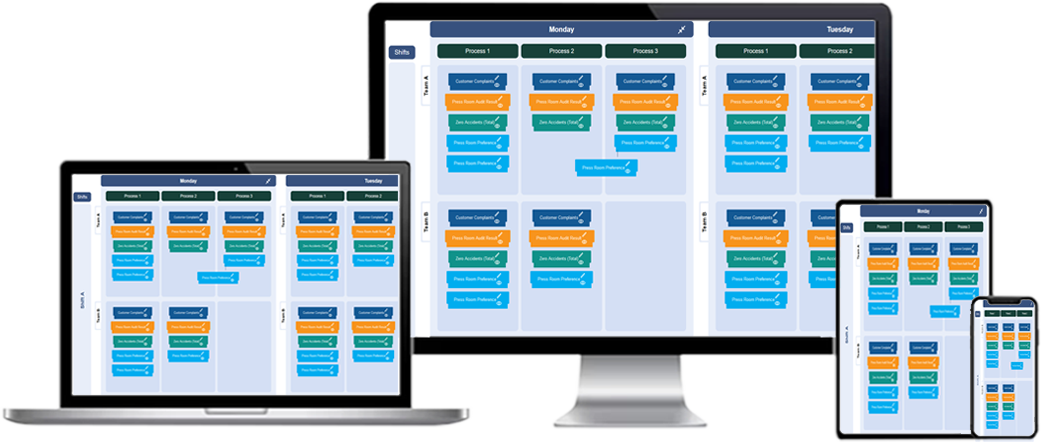
What is a Visual project management tool?
A visual project management tool is an application or system that helps teams manage projects by representing information visually. It uses charts, boards, timelines, and other visual formats to organize tasks, resources, and deadlines. These tools typically allow users to drag and drop tasks, move them through different stages, and assign them to team members in an easy-to-understand visual layout. Whether you are managing a team of employees, contractors, or external partners, a visual project management tool makes it easy to visualize the status of all tasks and activities in real-time.
Key Features of Visual Project Management Tools
1. **Task Organization:** Visual tools often use boards, lists, or grids to organize tasks and projects. These visual layouts help users quickly see what needs to be done, what's in progress, and what's complete. Task cards can include additional information, such as descriptions, due dates, assigned team members, and priority levels.
2. **Collaboration Features:** Collaboration is a major part of visual project management tools. Many tools allow team members to comment on tasks, add attachments, tag others, and receive notifications when changes are made. This ensures that everyone stays in the loop and no important details are missed.
3. **Timeline and Gantt Charts:** Gantt charts and timelines help visualize the project schedule and timelines. They represent tasks as horizontal bars, showing the start and end dates and how tasks overlap. These visual tools make it easier to track progress and ensure that deadlines are met.
4. **Progress Tracking:** Visual project management tools often provide real-time progress tracking to monitor how work is advancing. Whether you’re looking at a Kanban board, task list, or calendar, these tools can give an up-to-date snapshot of what’s been completed and what remains to be done.
5. **Task Dependencies and Milestones:** Tasks are rarely standalone; they often depend on other tasks. Visual project management tools allow you to create dependencies and establish milestones for the project. This feature ensures that all tasks are completed in the right order and that critical project milestones are met.
Benefits of Using a Visual project management tool
1. **Enhanced Organization:** Visual project management tools help keep everyone organized. With a visual interface, project tasks are clearly laid out, which makes it easy for team members to understand their responsibilities and stay on track. These tools also allow managers to quickly spot areas that may require attention, such as tasks that are falling behind schedule.
2. **Improved Collaboration:** A visual project management tool encourages teamwork and collaboration. With real-time updates, everyone involved in the project can access the same information and collaborate effectively. Team members can comment on tasks, share files, and discuss progress in one central place, reducing the need for endless email chains or scattered communication platforms.
3. **Better Communication:** Since all project details are displayed visually, there’s less risk of miscommunication. It’s clear who is responsible for what, what needs to be done, and when. Team members can easily update the status of their tasks, ensuring that everyone has access to the latest project information.
4. **Increased Efficiency:** With visual project management tools, teams can streamline workflows and reduce inefficiencies. Tasks are organized logically, and the progress is easily tracked, which helps ensure that work is completed on time and within budget. The ease of use and clear visual representation also help team members spend less time searching for information and more time completing tasks.
5. **Real-Time Updates:** One of the most important benefits of using a visual project management tool is the ability to track projects in real-time. This means that team members can immediately see when a task is completed or delayed, allowing for timely adjustments and decisions. Managers can stay informed about the overall progress of the project without needing to manually gather updates from each team member.
Types of Visual project management tools
1. **Kanban Boards:** A Kanban board is one of the most common visual tools for managing workflows. It displays tasks as cards that move through columns representing different stages of the project. For example, columns might include "To Do," "In Progress," and "Completed." Kanban boards help teams visually track the status of each task and ensure that the workflow remains smooth and efficient.
2. **Gantt Charts:** Gantt charts are often used for larger, more complex projects with multiple dependencies. They provide a timeline view, with tasks represented as horizontal bars that show their start and end dates. This type of chart is great for visualizing how tasks overlap and ensuring that all milestones and deadlines are met.
3. **Task Lists:** For simpler projects, a task list can be a great visual tool. Each task is listed with its details, such as due dates, assignees, and priority. Task lists provide a straightforward way to track progress, with options to mark tasks as complete or in progress. These are often combined with other visual tools, like Kanban boards or Gantt charts, to enhance tracking.
4. **Calendar Views:** Calendar views allow project managers to see tasks and deadlines on a calendar. This is particularly useful for projects with fixed deadlines or a time-sensitive nature. Team members can view tasks and appointments based on their assigned deadlines and work accordingly to meet those dates.
Choosing the Right Visual Project Management Tool
Choosing the right visual project management tool depends on the size and nature of the project. For simple projects, a Kanban board or task list may be sufficient, while larger projects with multiple dependencies may benefit from the more detailed visualization provided by Gantt charts. Additionally, some tools offer combinations of these views, allowing users to customize their project management approach based on their preferences and needs.
It’s also important to consider the level of collaboration required. If your team needs to work together closely and communicate frequently, a visual tool with strong collaboration features, such as comment threads and file sharing, is a must. For teams with many remote members, it’s essential to use a cloud-based tool that ensures everyone can access the latest information from anywhere.
Visual project management tool
What is a visual project management tool?
A visual project management tool is a platform that uses visual elements such as boards, cards, or timelines to help manage, track, and prioritize tasks and projects. It provides a clear, interactive view of project workflows, making it easy to understand project progress and dependencies.
How does a visual project management tool improve workflow?
A visual project management tool improves workflow by making it easier to organize tasks, track progress, and manage deadlines. By providing a visual representation of tasks and their statuses, team members can quickly assess what needs to be done, who is responsible, and when tasks are due.
What are the benefits of using a visual project management tool?
Benefits include enhanced visibility, improved collaboration, better resource allocation, task prioritization, and simplified progress tracking. The tool makes it easier to manage complex projects, stay on schedule, and improve team communication.
How do visual project management tools enhance team collaboration?
Visual project management tools enhance collaboration by providing a shared platform where team members can see and update tasks in real time. This transparency encourages communication, ensures that everyone is on the same page, and allows for quick adjustments as needed.
What types of projects benefit most from using a visual project management tool?
Projects with complex workflows, multiple tasks, and various team members benefit the most from visual project management tools. This includes software development, marketing campaigns, event planning, and product development, where tracking tasks and deadlines is critical to success.
Can visual project management tools be customized for different workflows?
Yes, visual project management tools are highly customizable. Users can modify workflows, categories, task stages, and timelines to suit their specific project needs. This flexibility allows teams to adapt the tool to any type of project or workflow.
What are the main features of a visual project management tool?
Main features include task visualization (boards, lists, or timelines), real-time updates, progress tracking, task assignment, deadline management, customizable workflows, and collaboration tools such as comments and file attachments. These features help teams stay organized and work efficiently.
How do visual project management tools help with task prioritization?
Visual tools allow teams to prioritize tasks by assigning deadlines, color-coding tasks based on urgency, and adjusting the sequence of tasks on the board. This ensures that the most critical tasks are addressed first and that project timelines are met.
Are visual project management tools suitable for small teams?
Yes, visual project management tools are suitable for teams of all sizes. Small teams can benefit from the simplicity, ease of use, and clear organization that visual tools offer. They help streamline workflows and ensure that everyone is on the same page without overwhelming the team with complex features.
How can visual project management tools help with tracking project progress?
Visual project management tools provide real-time updates and visual representations of task progress. Teams can easily see which tasks are completed, which are in progress, and which have not yet started, allowing for quick identification of any delays or bottlenecks.
Can visual project management tools be integrated with other business tools?
Yes, many visual project management tools integrate with other business tools such as time tracking software, communication platforms, and document storage systems. This integration allows for seamless data flow between tools, making it easier to manage projects holistically.
How do visual project management tools help manage deadlines?
Visual project management tools allow teams to set deadlines for each task and display them in an easy-to-follow visual format. This helps teams stay on track, monitor task timelines, and adjust as needed to ensure that all deadlines are met.
What are the key challenges of using a visual project management tool?
Key challenges may include a learning curve for new users, ensuring team members consistently update task statuses, and integrating the tool with existing business systems. However, with proper training and use, these challenges can be overcome.
How do visual project management tools improve project transparency?
Visual project management tools improve transparency by providing a clear view of the project’s progress, task ownership, deadlines, and dependencies. Everyone involved in the project can easily see what is happening, which helps reduce misunderstandings and encourages accountability.
What is the learning curve for using a visual project management tool?
The learning curve for visual project management tools is generally low, as many tools are designed to be intuitive and user-friendly. With basic training or tutorials, most users can quickly learn to navigate the tool and start managing projects effectively.