Efficient workflow management is crucial for any organization that aims to optimize its operations and enhance productivity. One of the most effective tools for streamlining workflows is the Kanban board view. Originally developed in the manufacturing industry, Kanban has since been adapted for various sectors, including project management, software development, and personal task tracking. The Kanban board offers a visual and systematic approach to managing tasks, helping teams stay organized, prioritize effectively, and track progress in real time.
1. What is a Kanban Board?
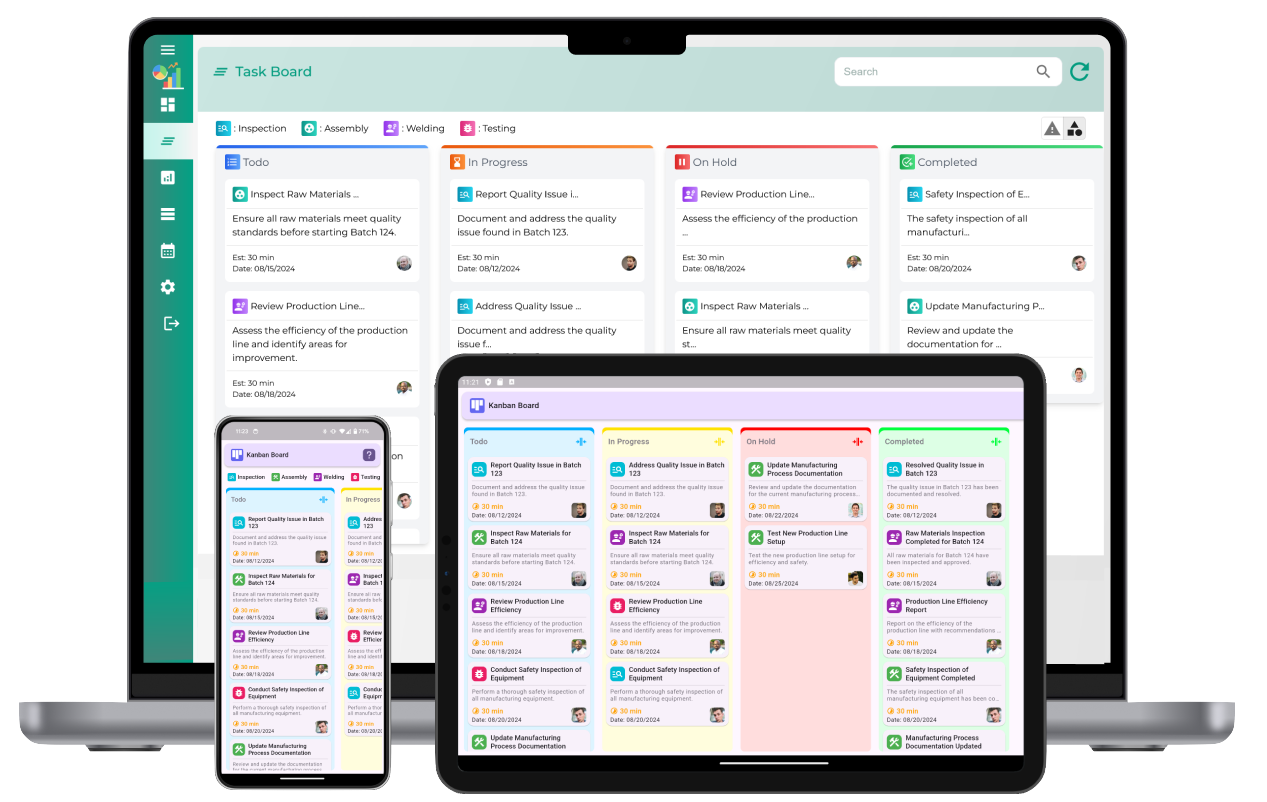
A Kanban board is a visual tool used to manage and track the flow of tasks through different stages of a workflow. The board is typically divided into columns that represent the various stages of a process. Each task is represented by a card that moves from one column to another as it progresses through the workflow. This simple yet powerful system provides a clear overview of the current status of tasks and helps identify bottlenecks and areas for improvement.
The columns on a Kanban board typically include the following stages:
- To Do: Tasks that are not yet started and are ready to be worked on.
- In Progress: Tasks that are currently being worked on.
- Done: Tasks that have been completed and are finished.
Depending on the complexity of the workflow, additional columns may be added, such as “Review,” “Testing,” or “On Hold,” to represent more specific stages of the process.
2. Benefits of Using a Kanban Board
The Kanban board offers several advantages for teams looking to streamline their workflows and improve task management:
- Visual Clarity: The Kanban board provides a clear, visual representation of the tasks in progress, making it easy for everyone to see the status of each task at a glance. This reduces confusion and ensures that all team members are on the same page.
- Task Prioritization: With a Kanban board, teams can easily prioritize tasks based on their importance or deadlines. This helps ensure that critical tasks are completed first and that team members focus on the most important work.
- Increased Efficiency: By visualizing the flow of tasks, teams can identify bottlenecks and inefficiencies in the workflow. This enables them to make adjustments and optimize processes to improve overall efficiency.
- Improved Collaboration: A Kanban board promotes collaboration by providing a shared view of the team’s tasks. Team members can easily see what others are working on, identify areas where they can help, and communicate more effectively.
- Reduced Overload: Kanban boards help teams limit the number of tasks in progress at any given time. This prevents work overload and ensures that team members are not stretched too thin, which can lead to burnout and decreased productivity.
- Real-Time Updates: Because the Kanban board is typically updated in real time, it provides a constantly accurate view of the team’s progress. This allows for better decision-making and faster responses to changing priorities or challenges.
3. How to Set Up a Kanban Board
Setting up a Kanban board is straightforward and can be done in a few simple steps. Here's how you can get started:
- Define the Workflow: Start by defining the stages of your workflow. These stages will become the columns on your Kanban board. The number and types of columns will vary depending on your specific process, but typical stages include “To Do,” “In Progress,” and “Done.” You can add more specific columns based on the complexity of your workflow.
- Create the Kanban Board: Choose a physical board, a digital tool, or a software application to create your Kanban board. A physical board can be as simple as a whiteboard with sticky notes, while digital tools offer more advanced features such as task assignment, due dates, and notifications.
- Add Tasks to the Board: Each task or project is represented by a card on the Kanban board. These cards should include relevant information such as the task name, description, due date, priority, and any other details that will help team members understand the work involved. Place the cards in the appropriate column based on their current status.
- Move Tasks Through the Workflow: As tasks progress, move the cards from one column to the next. This movement provides a visual representation of progress and ensures that everyone knows the current status of each task. Be sure to update the board regularly to reflect any changes.
4. Best Practices for Using a Kanban Board
To get the most out of your Kanban board, it’s important to follow some best practices:
- Limit Work in Progress (WIP): One of the key principles of Kanban is to limit the number of tasks in progress at any given time. This prevents work from piling up and ensures that team members can focus on completing tasks before starting new ones. Establishing WIP limits for each column can help prevent overload and improve efficiency.
- Focus on Flow: The goal of Kanban is to optimize the flow of tasks from one stage to the next. Regularly review the board to identify bottlenecks or tasks that are stuck in one stage for too long. If a task is taking longer than expected, investigate the cause and take corrective action.
- Prioritize Tasks: Not all tasks are created equal. Some tasks are more urgent or important than others. Make sure to prioritize tasks on the board so that team members know which ones to focus on first. This helps ensure that critical tasks are completed on time.
- Encourage Collaboration: A Kanban board is a collaborative tool, so encourage team members to work together to move tasks forward. When a task is stuck, others should step in to help or offer suggestions. Collaboration can help break through bottlenecks and improve the overall workflow.
- Regularly Review and Adjust: A Kanban board is not a static tool. It should be regularly reviewed to assess its effectiveness and make adjustments as needed. Hold regular meetings to review the board, discuss progress, and identify areas for improvement.
5. Kanban for Different Teams and Workflows
The versatility of the Kanban board makes it useful for a wide range of teams and workflows. Here are a few examples of how different teams can use Kanban boards:
- Project Management: Kanban boards are particularly effective for managing projects with multiple tasks and dependencies. They help project managers track the progress of individual tasks, identify potential delays, and ensure that the project stays on schedule.
- Software Development: Software development teams can use Kanban boards to manage the development cycle, from writing code to testing and deployment. The board provides visibility into the status of each feature or bug fix and helps teams collaborate effectively to resolve issues.
- Customer Support: Customer support teams can use Kanban boards to track customer inquiries, support tickets, and resolutions. The board helps ensure that no request is overlooked and that tickets are handled in a timely manner.
- Marketing: Marketing teams can use Kanban boards to manage campaigns, content creation, and other marketing initiatives. The board helps prioritize tasks, track progress, and ensure that all aspects of a campaign are completed on time.
Streamline workflows with Kanban Board view
What is a Kanban board and how does it help streamline workflows?
A Kanban board is a visual tool used to manage tasks and streamline workflows. It divides tasks into columns representing different stages of the workflow, helping teams visualize work progress, identify bottlenecks, and ensure tasks flow smoothly from start to finish.
How does the Kanban board improve task visibility?
The Kanban board provides a visual representation of all tasks in progress. With tasks clearly displayed in different stages, it allows team members to instantly see what needs attention, who is responsible for each task, and the current status, improving overall visibility.
What are the core principles of Kanban for workflow management?
The core principles of Kanban include visualizing work, limiting work in progress, focusing on flow, and continuously improving the process. By applying these principles, teams can create efficient workflows, reduce waste, and improve task delivery times.
How can Kanban boards reduce bottlenecks in workflows?
Kanban boards highlight areas where tasks are piling up, making it easy to spot bottlenecks. By limiting work in progress (WIP) and ensuring a balanced flow of tasks, teams can address bottlenecks quickly, helping to maintain steady progress across all stages.
What are the different stages in a Kanban board workflow?
A typical Kanban board workflow has stages such as "To Do," "In Progress," and "Completed." Depending on the workflow, additional stages like "Backlog" or "Review" may be added. These stages represent the different phases a task goes through, helping teams visualize task progress.
How does Kanban help in task prioritization?
Kanban helps with task prioritization by allowing teams to set clear visual markers for high-priority tasks. By organizing tasks into categories or color-coded labels, teams can focus on the most important tasks first, ensuring that critical work is completed on time.
How do Kanban boards help teams collaborate more efficiently?
Kanban boards improve team collaboration by providing a central, visual space for tracking tasks. Team members can easily see what tasks are assigned to whom, track progress, and identify potential challenges, making it easier to work together and stay aligned.
How can you customize a Kanban board to fit your team’s workflow?
You can customize a Kanban board by adjusting the columns and stages to match your team’s specific process. You can also add labels, color codes, or categories to help identify task types, priorities, or team assignments, tailoring the board to your workflow needs.
What are the benefits of using a Kanban board in project management?
Kanban boards offer several benefits for project management, including improved task visualization, enhanced team collaboration, better task prioritization, and reduced bottlenecks. They provide a clear view of work progress, making it easier to manage deadlines and deliverables.
How does a Kanban board enhance team productivity?
Kanban boards enhance productivity by making it easy for teams to see the status of all tasks at a glance. By limiting work in progress and focusing on task flow, teams can complete tasks more efficiently, reduce delays, and maintain steady progress toward project goals.
How do you track progress with a Kanban board?
Progress on a Kanban board is tracked by moving tasks through the various stages or columns. As tasks move from "To Do" to "In Progress" to "Completed," teams can track the overall progress and identify any work that is stuck in a particular stage.
Can Kanban boards be used for both personal and team workflows?
Yes, Kanban boards can be used for both personal and team workflows. For personal use, individuals can track personal tasks, while teams can use the board to manage collaborative projects. In both cases, the visual nature of the board helps to streamline task management.
How does the visual nature of a Kanban board contribute to workflow efficiency?
The visual nature of a Kanban board makes it easy for teams to see the status of each task and identify potential issues or delays. The board offers a clear, at-a-glance overview, which helps team members stay aligned and maintain smooth task flow.
How does the Kanban system encourage continuous improvement?
The Kanban system encourages continuous improvement by making workflow challenges visible. Teams can regularly assess the board to identify inefficiencies, bottlenecks, and areas for improvement, allowing for ongoing optimization of the process.
What are the common mistakes to avoid when using a Kanban board for workflow management?
Common mistakes include having too many tasks in the "In Progress" column (leading to overload), not setting clear task priorities, and failing to regularly update the board. Ensuring proper work-in-progress limits, clear task labeling, and frequent updates can help avoid these pitfalls.