Kanban is a powerful, visual workflow management tool that helps teams and organisations improve productivity, optimise processes, and deliver high-quality results. It originated from lean manufacturing principles and is now widely adopted in various industries such as software development, marketing, and operations management. The core of Kanban lies in its simplicity: using visual elements to track the flow of tasks and limiting the amount of work in progress (WIP) to ensure smoother processes.
Key Principles of Kanban
There are a few essential principles that guide the effective use of Kanban:
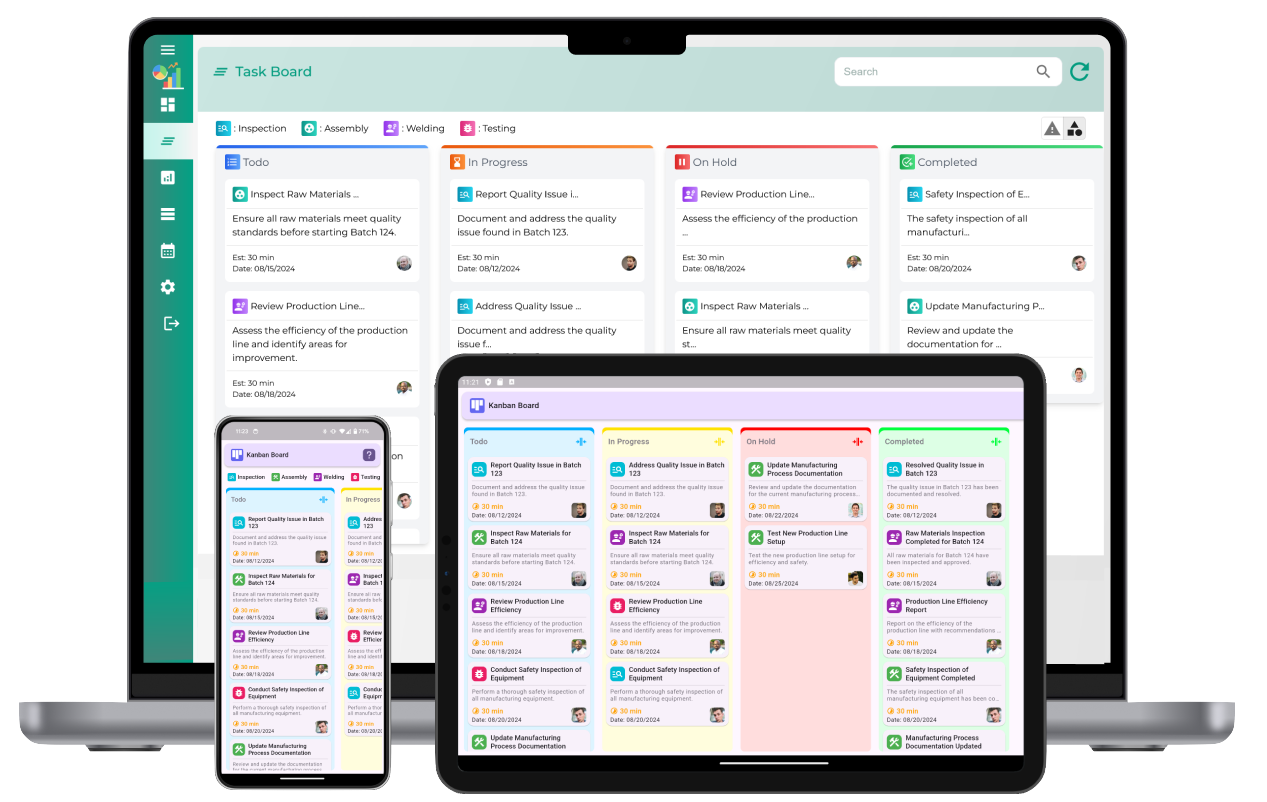
- Visualizing Work: The Kanban board displays tasks as cards that move through columns representing different stages of the process (e.g., To-Do, In Progress, Completed). This visual representation provides transparency and helps teams stay focused on what needs to be done.
- Limiting Work in Progress (WIP): One of the primary goals of Kanban is to prevent teams from becoming overloaded. By limiting the number of tasks in progress at any given time, Kanban encourages teams to complete work before starting new tasks, which results in better focus and faster task completion.
- Flow Management: Kanban emphasizes the smooth flow of work across the board. It aims to identify and eliminate bottlenecks that slow down progress, improving the overall efficiency of the process.
- Continuous Improvement: Kanban is not a one-time fix but a philosophy of ongoing refinement. Teams regularly analyze their workflow, identify areas of improvement, and make adjustments to enhance performance.
How Kanban Works
A typical Kanban system consists of the following components:
- Kanban Board: The board is divided into columns, with each column representing a stage in the workflow. For example, columns might include "Backlog," "To Do," "In Progress," and "Completed." Teams can adjust the columns according to their specific workflow needs.
- Kanban Cards: Each task or work item is represented by a card, which contains details about the task, such as its title, description, and due date. As tasks progress, the cards move from one column to the next, providing visibility into the status of work.
- Work-in-Progress Limits (WIP Limits): Each column on the Kanban board has a limit on how many tasks can be in progress at once. WIP limits ensure that teams don’t start too many tasks simultaneously, which can lead to inefficiencies and delays. By managing WIP, Kanban encourages teams to finish tasks before moving on to new ones.
- Pull System: Kanban uses a pull system, where team members pull a new task from the "To Do" column when they have capacity to take on more work. This approach ensures that work is completed in order of priority and without overwhelming the team.
Benefits of Using Kanban
- Improved Efficiency: By visualizing work and limiting WIP, Kanban reduces bottlenecks and allows teams to focus on completing tasks rather than starting new ones. This leads to faster turnaround times and higher productivity.
- Increased Transparency: The Kanban board provides a clear, real-time overview of all ongoing tasks. This transparency improves collaboration and makes it easier for team members to understand what others are working on.
- Better Work Prioritization: With Kanban, tasks are organized based on priority and managed in a way that prevents overloading any one part of the process. Teams can focus on high-priority work first, ensuring that resources are allocated efficiently.
- Faster Delivery Times: By focusing on completing tasks before taking on new ones, Kanban helps teams deliver high-quality work more quickly. The system promotes a continuous flow of work, ensuring that tasks move through the pipeline smoothly.
- Flexibility and Adaptability: Kanban is highly adaptable to different industries, workflows, and team sizes. Whether you're managing software development, marketing projects, or operations, Kanban can be customized to suit your needs and scale as your team grows.
Implementing Kanban in Your Workflow
Implementing Kanban into your workflow doesn’t have to be complicated. Here’s how to get started:
- Set Up Your Kanban Board: Choose a platform for your Kanban board, whether physical (such as a whiteboard and sticky notes) or digital (using online tools). Organize your board into columns representing each stage of your workflow.
- Define WIP Limits: Set WIP limits for each column on the board to ensure that no stage becomes overloaded. This will help prevent bottlenecks and ensure that tasks are completed efficiently.
- Visualize Your Workflow: Start adding tasks to your Kanban board. Each task should be represented as a card with clear information, such as task name, description, and due date.
- Monitor and Adapt: As you start using Kanban, observe how tasks move through the system. If you notice bottlenecks or inefficiencies, make adjustments to your WIP limits, columns, or task assignments. Kanban is all about continuous improvement.
- Focus on Continuous Improvement: Hold regular meetings or retrospectives to discuss what’s working and what’s not. Encourage feedback from team members and make adjustments to improve the workflow continuously.
Kanban for Teams of All Sizes
Kanban is an incredibly flexible system that can be adapted for teams of any size, whether you're managing a small team of a few people or a large organization with multiple departments. It’s effective in both collaborative environments and individual workflows, making it a versatile choice for a wide range of industries.
Teams can use Kanban to streamline project management, boost communication, and ensure that tasks are handled in the most efficient manner possible. With a few simple rules and principles in place, Kanban helps organizations of all types achieve better productivity, reduced cycle times, and improved team collaboration.
Conclusion
Kanban is a simple yet highly effective workflow management tool that has the power to transform how teams work together and improve operational efficiency. By visualizing tasks, limiting work in progress, and focusing on continuous improvement, Kanban promotes a smooth and efficient flow of work.
Its adaptability and flexibility make it suitable for various industries, from software development to marketing and beyond. Whether you’re managing a small project or a large-scale operation, Kanban can help optimize your workflow, enhance collaboration, and drive higher productivity. Start using Kanban today and experience the benefits of a more organized, efficient, and effective way of working.
A One Minute Introduction to Kanban
What is Kanban?
Kanban is a visual workflow management method designed to optimize task tracking and improve efficiency. It uses boards, columns, and cards to represent work and its progress through different stages.
What is the purpose of Kanban?
The purpose of Kanban is to provide a clear visual representation of work, prioritize tasks effectively, and streamline workflow by focusing on completing tasks before starting new ones.
How does Kanban help with task management?
Kanban helps with task management by breaking down work into manageable tasks, visualizing their progress, and ensuring teams focus on completing tasks efficiently without overloading resources.
What are the core principles of Kanban?
The core principles of Kanban include visualizing work, limiting work in progress (WIP), managing flow, making process policies explicit, and pursuing continuous improvement through feedback.
What are the key components of a Kanban system?
The key components of a Kanban system are visual boards, task cards, columns for workflow stages, and WIP limits to control the number of tasks in progress at any given time.
How does Kanban improve workflow?
Kanban improves workflow by visualizing tasks, identifying bottlenecks, and enforcing WIP limits to ensure work progresses smoothly and efficiently through various stages.
Can Kanban be used for personal productivity?
Yes, Kanban is highly effective for personal productivity. Individuals can use it to organize tasks, prioritize work, and track progress visually to stay focused and efficient.
What industries benefit from Kanban?
Kanban is widely used in industries such as manufacturing, software development, healthcare, logistics, education, and marketing for its ability to streamline processes and improve task management.
What is the significance of WIP limits in Kanban?
WIP limits control the number of tasks that can be in progress at a time. This prevents teams from overcommitting, reduces multitasking, and ensures focus on task completion.
How do Kanban boards visualize work?
Kanban boards visualize work by displaying tasks as cards in columns that represent workflow stages. Teams can easily track task status and identify bottlenecks at a glance.
What is the difference between Kanban and Scrum?
Kanban is a flexible, continuous workflow management system, while Scrum is an iterative framework that organizes work into fixed-length sprints. Kanban focuses on flow, whereas Scrum emphasizes planning and time-boxed work cycles.
Can Kanban be used for remote teams?
Yes, Kanban is ideal for remote teams. Digital Kanban boards allow team members to collaborate, update tasks, and track progress in real-time from anywhere.
How does Kanban reduce bottlenecks?
Kanban reduces bottlenecks by visualizing workflow and highlighting areas where tasks accumulate. Teams can identify and address these issues to ensure work moves smoothly.
What is the best way to start using Kanban?
The best way to start using Kanban is to create a basic board with columns like "To Do", "In Progress", and "Done". Gradually add WIP limits and refine workflow stages as the team gains experience.
How does Kanban promote continuous improvement?
Kanban promotes continuous improvement by encouraging teams to regularly analyze workflow, identify inefficiencies, and implement changes to optimize processes and boost productivity.