TCard software is an effective digital tool designed to manage tasks, workflows, and projects through visual boards. It helps teams organize and track the progress of work in a clear and intuitive way. By leveraging the functionality of TCard software, businesses can streamline their operations, improve collaboration, and ensure efficient task management.
What is Tcard Software?
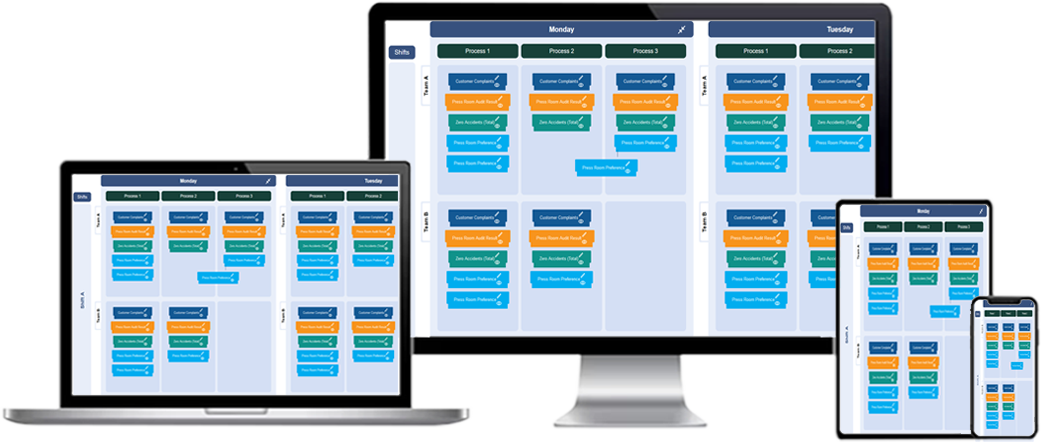
TCard software offers a digital representation of the traditional physical TCard system, a popular method for organizing tasks and workflow management. This software solution allows businesses to visually track tasks, projects, and processes by creating "cards" that represent individual tasks or milestones. These cards are organized within customizable categories, usually referred to as columns, which represent different stages in a workflow or project lifecycle.
The core objective of TCard software is to enhance task tracking and management by providing a clear, color-coded visual overview of progress. It helps teams to stay organized, collaborate effectively, and prioritize tasks based on deadlines, importance, or status. TCard software can be used in a variety of industries, including project management, inventory control, operations, and more.
How Does Tcard Software Work?
TCard software works by breaking down a project or workflow into individual tasks or steps, which are represented as "cards." These cards are displayed on a virtual board with columns that categorize tasks by their current status or stage of completion. Common stages may include "To Do," "In Progress," and "Completed," but users can customize these stages to suit their specific workflow needs.
The key features of TCard software typically include:
- Visual Board: The central feature of TCard software is a visual board that displays tasks as cards in various columns. Each card contains details about the task, such as its title, due date, assigned team member, and priority level.
- Customizable Columns: Users can create columns that represent different stages of a task, allowing for a more flexible and tailored workflow. Examples include "Planning," "Execution," and "Review."
- Drag-and-Drop Functionality: Cards can be moved between columns with a simple drag-and-drop action, reflecting progress and updating the task’s status in real time.
- Task Details: Each card includes essential information, such as task description, due date, priority, team members, and progress notes. Some systems also allow attachments for files or documents relevant to the task.
- Real-Time Updates: As tasks are updated, the software automatically updates the board, allowing team members to view the most current information and stay on the same page.
Benefits of Using Tcard Software for Monitoring
Implementing TCard software for monitoring and managing tasks offers several key advantages for teams and organizations:
1. Enhanced Visibility
One of the most significant benefits of TCard software is its ability to provide enhanced visibility into the progress of tasks and projects. Teams can easily see what tasks are being worked on, which ones are completed, and which ones are still pending. This visual representation helps avoid misunderstandings and ensures that no task is overlooked.
2. Streamlined Task Management
With TCard software, task management becomes much more efficient. Users can quickly create, assign, and prioritize tasks with a few clicks, reducing the time spent organizing and tracking tasks manually. The clear visual display also makes it easier for team members to stay focused and understand their responsibilities.
3. Improved Collaboration
TCard software fosters better collaboration by enabling team members to share task boards, comment on individual cards, and track progress collectively. This collaborative environment ensures that everyone is aligned on the status of a project and can contribute to resolving issues or advancing tasks when needed.
4. Customization for Unique Workflows
Different industries and teams have varying needs and processes. TCard software allows users to customize their boards and workflows according to specific requirements. Whether it's tracking marketing campaigns, managing inventory, or overseeing project timelines, TCard software can adapt to suit a wide range of use cases.
5. Increased Efficiency and Productivity
By providing a clear and organized view of tasks, TCard software helps reduce confusion and unnecessary meetings. Teams can focus on the tasks at hand, knowing exactly what is expected and where they need to allocate their time and resources. Additionally, the software’s ability to track deadlines and set reminders ensures that tasks are completed on time, further boosting productivity.
How to Use Tcard Software for Monitoring Tasks
To fully leverage TCard software for monitoring, it's essential to follow best practices that ensure tasks are tracked effectively. Here are key steps to get started:
1. Set Up Task Categories and Columns
Begin by creating categories or columns that represent different stages of your workflow or project. For example, a typical project may have columns such as "To Do," "In Progress," and "Completed." Custom columns like "Waiting on Approval" or "Testing" can also be added based on your needs. These columns provide structure and help define how tasks flow through the system.
2. Create and Organize Tasks
Once your columns are set up, begin creating tasks by adding cards to the board. Include as much detail as possible on each card, such as task descriptions, deadlines, and assigned team members. Organizing tasks by priority or importance helps ensure that critical tasks are addressed first.
3. Assign Tasks to Team Members
Ensure that each task is assigned to the appropriate team member or department. This accountability ensures that everyone knows their responsibilities and deadlines. It also prevents confusion over who is working on what.
4. Track Progress and Move Cards
As tasks progress, move the corresponding cards through the appropriate columns to reflect their status. This dynamic process helps provide an up-to-date view of project progress and prevents tasks from slipping through the cracks.
5. Monitor and Adjust the Workflow
Regularly monitor the board to ensure that tasks are moving forward as planned. If you notice bottlenecks or delays, investigate the root causes and adjust the workflow accordingly. For example, if several tasks are stuck in the "In Progress" column, it may be necessary to redistribute resources or adjust priorities.
Integrating TCard Software into Existing Workflows
Integrating TCard software into your existing processes requires a thoughtful approach. Begin by evaluating your current task management system to identify areas where the TCard software can add value. Consider the types of workflows you manage and customize the software to suit those needs. Training team members on how to use the software effectively will also help ensure smooth adoption.
Monitoring Tcard software
What is Monitoring TCard software?
Monitoring TCard software is a tool that helps track and manage tasks, projects, and workflows by providing a visual interface where tasks are represented as cards. The software allows for monitoring the progress of these tasks, providing a clear overview of their status and any changes made.
How does Monitoring TCard software improve task management?
Monitoring TCard software improves task management by allowing users to visualize tasks in various stages of completion. It provides an intuitive interface for assigning tasks, setting priorities, tracking progress, and making adjustments as needed to keep projects on track.
What are the key features of Monitoring TCard software?
Key features of Monitoring TCard software include customizable task cards, progress tracking, color coding for task priorities, real-time updates, deadline management, and the ability to move tasks between stages such as "To Do," "In Progress," and "Completed."
How does TCard software track project progress?
TCard software tracks project progress by allowing users to move task cards through different stages. As tasks are completed or updated, their position on the TCard board reflects the current status, providing an instant visual representation of progress across the entire project.
Can Monitoring TCard software be used for team collaboration?
Yes, Monitoring TCard software can be used for team collaboration by allowing multiple users to access and update the task board. Team members can assign tasks, provide updates, and comment on cards, ensuring everyone is informed about the project's status and next steps.
What types of tasks can be managed using TCard software?
TCard software can be used to manage a wide range of tasks, including project milestones, daily tasks, work assignments, deadlines, and inventory management. It is flexible enough to adapt to various use cases such as project management, task prioritization, and resource allocation.
How does Monitoring TCard software help identify bottlenecks?
Monitoring TCard software helps identify bottlenecks by visually highlighting tasks that are delayed or not moving forward. This makes it easier to spot areas where progress is stalled, allowing teams to address issues promptly and prevent delays from affecting the overall workflow.
How can TCard software be customized to suit different projects?
TCard software can be customized by adjusting task categories, color codes, and workflow stages to align with the specific needs of a project. Whether the project involves complex workflows or simple task lists, the software can be tailored to provide the right level of detail and control.
How does Monitoring TCard software enhance task prioritization?
Monitoring TCard software enhances task prioritization through features such as color coding and assigning priority levels to tasks. This helps users quickly identify high-priority tasks and ensures that the most critical tasks are addressed first, improving overall efficiency and focus.
Can TCard software be used for both personal and team task management?
Yes, TCard software is versatile and can be used for both personal task management and team collaboration. For personal use, individuals can manage their own tasks and deadlines, while teams can collaborate and track group projects in a shared workspace.
How does Monitoring TCard software support deadline management?
Monitoring TCard software supports deadline management by allowing users to set due dates for each task. Tasks that are approaching or past their deadlines are easily identified, helping users stay on track and prioritize work to meet deadlines efficiently.
What is the role of color coding in TCard software?
Color coding in TCard software helps categorize tasks based on their priority or status. For example, red might indicate high-priority tasks, yellow for medium-priority, and green for completed tasks. This visual system makes it easy for users to identify important tasks at a glance.
How does Monitoring TCard software help with visual task tracking?
Monitoring TCard software helps with visual task tracking by providing a clear, visual representation of tasks on a board. Tasks are displayed as cards that can be moved across columns, allowing users to easily track the progress of individual tasks and the overall project.
Can TCard software integrate with other project management tools?
Yes, TCard software can be integrated with other project management tools to streamline workflows. Integration allows for seamless data transfer and ensures that all task information is synchronized across platforms, providing a unified view of project status.
How does Monitoring TCard software assist in performance analysis?
Monitoring TCard software assists in performance analysis by providing data on task completion rates, progress over time, and any delays or bottlenecks. This helps teams assess how efficiently they are working and identify areas for improvement in their processes.