The Kanban board tool is a highly effective visual management system that facilitates workflow organization and optimization. Originating from lean manufacturing principles, it has evolved into a widely used tool for project management, task tracking, and team collaboration. By providing a clear and dynamic overview of work processes, the Kanban board tool enhances productivity and ensures tasks progress efficiently through different stages of completion.
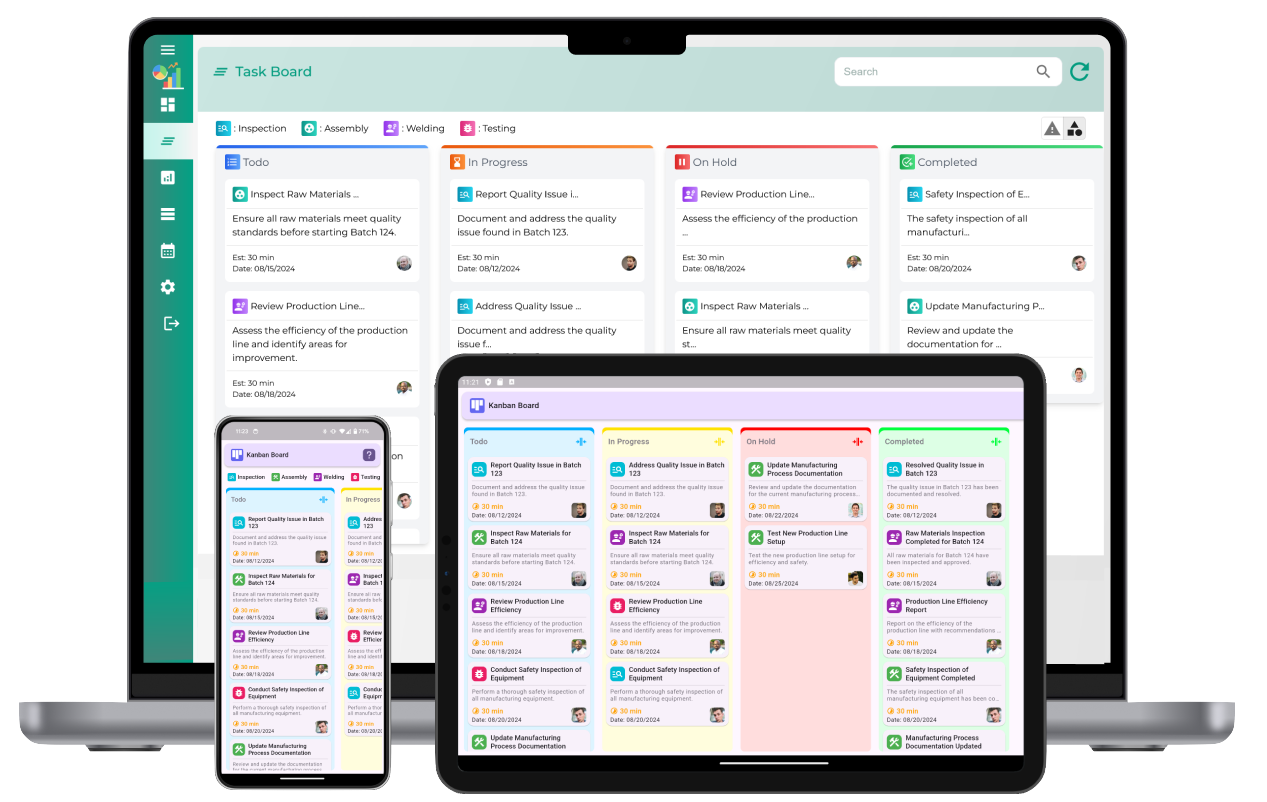
Understanding the Structure of a Kanban Board
A Kanban board typically consists of columns that represent different stages of a workflow. Common column headers include:
- To Do: Tasks that are yet to be started.
- In Progress: Tasks currently being worked on.
- Completed: Tasks that have been finished.
The board can be customized to fit the specific needs of a team or project, with additional columns such as "Review," "Blocked," or "On Hold" as required. Each task is represented by a card that can contain details such as task descriptions, assignees, deadlines, and priority levels.
Key Features of a Kanban Board Tool
The Kanban board tool offers several features that make it a valuable asset for teams across various industries:
- Visual Task Management: The board provides an at-a-glance view of all tasks, making it easy to identify priorities and bottlenecks.
- Drag-and-Drop Functionality: Users can move cards between columns as tasks progress through different workflow stages.
- Customizable Columns: Teams can tailor the board to reflect their unique processes and workflows.
- Task Details: Each card can include descriptions, deadlines, checklists, and comments, ensuring all relevant information is accessible in one place.
- Collaboration Tools: Team members can collaborate in real-time, updating the board and communicating about tasks seamlessly.
Benefits of Using a Kanban Board Tool
Implementing a Kanban board tool offers numerous advantages for individuals and teams:
- Improved Transparency: Everyone on the team can see the current status of tasks, fostering accountability and shared understanding.
- Enhanced Efficiency: The clear visualization of workflows helps identify inefficiencies and areas for improvement.
- Better Prioritization: Tasks can be organized by importance or urgency, ensuring critical work is addressed promptly.
- Adaptability: The tool is versatile and can be used for various projects, from software development to marketing campaigns.
- Continuous Improvement: Teams can analyze workflow data to identify patterns and implement changes for better performance over time.
Applications of the Kanban Board Tool
The Kanban board tool is suitable for diverse use cases across industries:
- Software Development: Managing feature development, bug fixes, and deployments in agile workflows.
- Marketing Campaigns: Tracking content creation, approvals, and campaign execution.
- Product Management: Coordinating design, production, and release schedules.
- Human Resources: Managing recruitment, onboarding, and employee engagement initiatives.
- Personal Productivity: Organizing daily tasks, setting goals, and tracking progress.
Best Practices for Using a Kanban Board Tool
To maximize the benefits of the Kanban board tool, consider the following best practices:
- Limit Work in Progress: Set limits on the number of tasks in each column to prevent overloading and ensure focus on priority tasks.
- Regular Updates: Keep the board updated to reflect the current status of tasks accurately.
- Collaborate Effectively: Encourage team members to communicate and share updates directly on the board.
- Analyze and Optimize: Periodically review the board to identify bottlenecks and areas for process improvement.
- Customize as Needed: Adjust the board’s structure and features to align with changing project requirements.
Kanban Board Tool
What is a Kanban board tool?
A Kanban board tool is a visual project management application that organizes tasks into columns representing different stages of a workflow. It helps teams visualize work, track progress, and manage tasks efficiently.
How does a Kanban board tool work?
A Kanban board tool uses a card-based system to represent tasks. These cards are moved across columns, such as "To Do," "In Progress," and "Done," to reflect their current status in the workflow.
What are the key features of a Kanban board tool?
Key features include customizable columns, drag-and-drop functionality for tasks, task details, labels for prioritization, due dates, and progress tracking. Advanced tools may also include analytics and reporting capabilities.
Why is a Kanban board tool useful for project management?
A Kanban board tool enhances project management by providing a clear overview of tasks, improving communication, reducing task overlap, and helping teams manage workloads effectively.
Can a Kanban board tool improve team collaboration?
Yes, a Kanban board tool improves team collaboration by offering a shared visual space where team members can update task statuses, assign responsibilities, and communicate directly within the tool.
How do you set up a Kanban board tool for a project?
To set up a Kanban board tool, define workflow stages as columns, add tasks as cards, and assign them to team members. Customize labels, deadlines, and priorities based on project requirements.
What are the benefits of using a digital Kanban board tool?
Digital Kanban board tools offer benefits like real-time updates, accessibility from multiple devices, integration with other tools, detailed analytics, and enhanced collaboration across remote teams.
How does a Kanban board tool help with task prioritization?
A Kanban board tool helps prioritize tasks by allowing users to label and rank tasks based on urgency, importance, or deadlines. High-priority tasks can be visually highlighted for immediate attention.
Is a Kanban board tool suitable for all types of projects?
While a Kanban board tool is versatile and suitable for many projects, it works best for tasks that require continuous flow management rather than highly structured or sequential processes.
How do you track progress using a Kanban board tool?
Progress is tracked by moving task cards across workflow columns. Advanced tools may offer charts, cumulative flow diagrams, and progress summaries for a detailed view of the project's status.
What is the difference between a physical and digital Kanban board?
A physical Kanban board uses physical cards and columns, while a digital Kanban board is an online tool with additional features like collaboration, automation, and analytics.
Can a Kanban board tool integrate with other project management tools?
Yes, many Kanban board tools integrate with other applications like email, calendars, and reporting software to streamline workflows and enhance functionality.
How does a Kanban board tool help in identifying bottlenecks?
Kanban board tools make bottlenecks visible by showing where tasks accumulate in a specific column, indicating areas where resources or processes may need optimization.
What metrics can be tracked using a Kanban board tool?
Common metrics include lead time, cycle time, task completion rate, and work-in-progress limits. These metrics help evaluate and optimize workflow efficiency.
What are the common challenges when using a Kanban board tool?
Challenges include overloading the board with tasks, failing to enforce work-in-progress limits, and neglecting regular reviews, which can reduce the tool's effectiveness.