Lean project management is focused on delivering maximum value to the customer while minimizing waste. One of the fundamental principles of lean management is to visualize work, limit work in progress, and continuously improve processes. Kanban and TCard boards are both valuable tools in this regard, providing teams with a visual method to manage work, track progress, and highlight areas for improvement. While both boards share similar purposes, they have distinct features that make them better suited for different aspects of lean project management.
What is a Kanban Board?
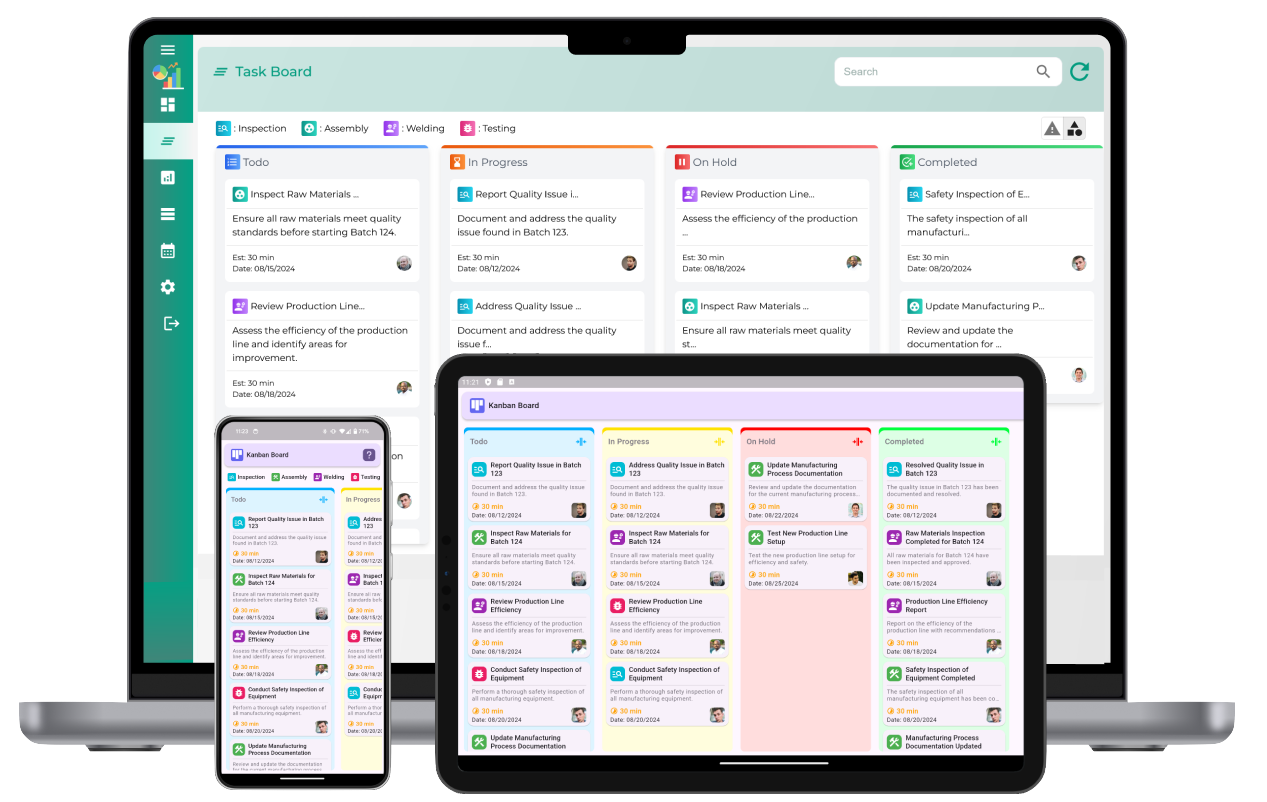
The Kanban board is a visual tool that originates from lean manufacturing and is widely used in project management. It consists of columns that represent different stages of the project or workflow, with tasks represented by cards that move through these stages. The typical columns in a Kanban board might include "To Do," "In Progress," and "Done," though these can be customized based on the specific needs of the team and the project.
The Kanban method emphasizes limiting work in progress (WIP) to improve focus and prevent bottlenecks. By visualizing work items on the board, team members can easily track the status of tasks, identify blockages, and ensure that work moves smoothly through each stage of the project. The simplicity of the Kanban board makes it an excellent tool for managing project flow, optimizing resources, and promoting collaboration among team members.
What is a TCard Board?
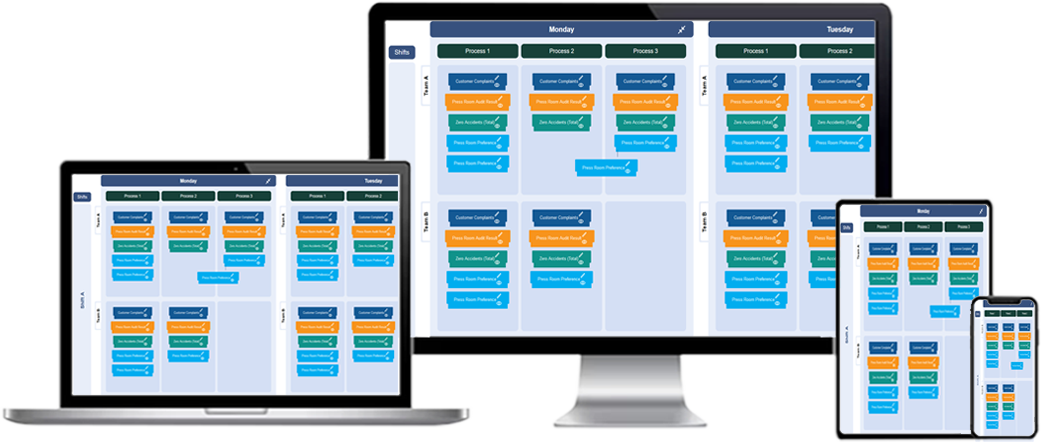
A TCard board, also known as a TCard system, is a more customizable tool that also visualizes the flow of tasks through various stages. Similar to the Kanban board, TCard boards use cards to represent individual tasks or work items. However, TCard boards offer more flexibility in terms of how these cards are categorized, organized, and tracked. TCard boards can be customized with additional columns, tags, and filters to meet the specific needs of a project, making them an ideal solution for teams with complex workflows.
In addition to simple visualizations of task flow, TCard boards often allow for greater detail on each card. Cards can include important information such as task deadlines, assigned personnel, dependencies, and priority levels. This enhanced level of detail can be particularly useful for managing large-scale projects or projects that involve multiple teams and resources.
Key Differences Between Kanban and TCard Boards
Both Kanban and TCard boards are effective tools for visual project management, but they differ in the level of detail they offer and their suitability for different types of projects. Here are the key differences:
1. Simplicity vs. Customization
The Kanban board is straightforward and simple, focusing primarily on the flow of tasks through a predefined set of columns. This simplicity makes it easy for teams to get started quickly and use the board effectively. However, this simplicity can also be limiting, especially for complex projects that require tracking multiple workflows, categories, or tasks with specific dependencies.
On the other hand, TCard boards are highly customizable and can be tailored to the specific needs of a project. This makes them more suitable for teams with complex workflows or projects that involve multiple stages, priorities, and resources. TCard boards allow for more flexibility in how tasks are visualized and tracked, which can be essential for lean project management when working with various departments or specialized tasks.
2. Focus on Workflow vs. Task Detail
Kanban boards are primarily designed to visualize the flow of tasks through different stages of a process. While the focus is on tracking task movement and limiting WIP, there is often less emphasis on the detailed information behind each task. Kanban boards are ideal for teams that need a high-level view of the project and want to focus on improving workflow efficiency.
In contrast, TCard boards often include more detailed information on each task, such as deadlines, task dependencies, and resource requirements. This added level of detail can be helpful for managing projects with intricate task dependencies, resource allocations, and tight deadlines. By offering a comprehensive view of each task, TCard boards provide project managers with more insight into the factors that can influence the project's success.
3. Flexibility in Visual Layout
Kanban boards typically use a standard layout with columns that represent stages in the workflow. While this layout is effective for most projects, it can be limiting when the project requires more detailed categorization or when multiple workflows need to be tracked simultaneously. The standard Kanban board is usually best suited for simple processes with a linear progression.
TCard boards are more flexible in terms of layout and organization. In addition to columns that represent stages in the workflow, TCard boards allow for custom categories, tags, and labels that can be used to categorize tasks by priority, team, or location. This makes TCard boards particularly useful for managing complex projects with multiple teams, departments, or workstreams. The visual layout can be adjusted to reflect the specific needs of the project, making TCard boards more adaptable for different types of work.
How Both Tools Support Lean Project Management
1. Visualizing Work
Both Kanban and TCard boards support the lean principle of visualizing work. By displaying tasks on a board, team members can easily see what needs to be done, what is in progress, and what has been completed. This visibility is crucial for lean project management because it allows teams to quickly identify bottlenecks, prioritize tasks, and make data-driven decisions.
For example, in a Kanban board, if there are too many tasks in the "In Progress" column, team members can identify a bottleneck and take corrective action. Similarly, in a TCard board, detailed task information such as priority levels and dependencies can provide additional context, helping teams better understand the reasons behind delays or issues in the workflow.
2. Limiting Work in Progress (WIP)
One of the core principles of lean management is limiting WIP to prevent overloading the system and reduce inefficiencies. Both Kanban and TCard boards facilitate this principle by visually representing the number of tasks in progress at any given time. In a Kanban system, teams often set WIP limits for each column to ensure that only a manageable number of tasks are in progress at once.
While Kanban boards have WIP limits built into the system, TCard boards also allow teams to apply WIP limits in a more flexible manner. For instance, TCard boards can be customized to track WIP limits for different teams or workflows, ensuring that each area of the project is balanced and not overwhelmed by tasks. This helps to ensure that work is completed efficiently and that team members are not overburdened.
3. Continuous Improvement
Lean project management focuses on continuous improvement, or Kaizen, to eliminate waste and enhance processes. Both Kanban and TCard boards support this principle by providing teams with the ability to track their progress over time and identify areas for improvement. Regularly reviewing the board can highlight inefficiencies, delays, and bottlenecks, providing valuable insights for making incremental improvements to the workflow.
For example, Kanban boards often feature metrics such as lead time, cycle time, and throughput, which can be used to evaluate the efficiency of the process. Similarly, TCard boards allow teams to track detailed task information and use that data to identify areas for improvement. The flexibility of TCard boards makes it easier to analyze project data and make adjustments based on specific needs or challenges.
What is the difference between a Kanban board and a TCard board in lean project management?
A Kanban board focuses on limiting work in progress and optimizing flow by using columns and cards to visualize tasks. A TCard board offers greater flexibility for customizing stages and categories, making it ideal for more complex lean project workflows. While both boards support visual task management, TCard boards are better suited for managing multiple processes and stages.
How does a Kanban board support lean principles in project management?
A Kanban board supports lean principles by visualizing workflow, limiting work in progress, and reducing waste. It allows teams to manage the flow of tasks, ensuring that work is completed efficiently while preventing bottlenecks and overburdening any part of the process.
How does a TCard board improve lean project management efficiency?
A TCard board improves lean project management efficiency by offering a customizable system that tracks tasks through various stages of the project. With its ability to categorize tasks and represent stages visually, TCard boards help teams stay organized, identify issues quickly, and streamline processes.
Why might a TCard board be more suitable than a Kanban board for complex lean projects?
A TCard board is more suitable for complex lean projects because it provides greater flexibility in customizing columns, categories, and stages. This customization allows teams to track multiple workflows simultaneously and manage intricate dependencies within the project, something Kanban boards may struggle with due to their simpler structure.
How can a Kanban board help reduce waste in lean project management?
A Kanban board reduces waste by visualizing the work process and identifying tasks that are delayed or overburdened. By limiting work in progress, teams can focus on completing tasks before taking on new ones, reducing unnecessary work and streamlining the workflow, which helps eliminate inefficiencies and waste.
What role does a TCard board play in visualizing work in progress in lean project management?
A TCard board plays a significant role in visualizing work in progress by allowing teams to track tasks across various stages and categories. This visual representation helps identify where tasks are within the process, ensuring that no work is left stagnant and that resources are effectively allocated to reduce delays.
Can TCard boards help identify bottlenecks in lean project management?
Yes, TCard boards help identify bottlenecks by showing where tasks accumulate in a specific stage. When tasks are not progressing as expected, team members can quickly spot the problem and address the issue before it affects the entire project flow.
What advantages does a Kanban board offer for managing project flow in lean projects?
A Kanban board provides clear visibility of the project flow, making it easy to track task progress, detect delays, and adjust resources accordingly. By limiting work in progress, Kanban helps teams maintain a steady flow of work, preventing bottlenecks and optimizing overall project performance.
How can TCard boards be customized for specific lean project management needs?
TCard boards can be customized by adding multiple columns that represent different project stages, categories, or priorities. This customization ensures that the board meets the specific needs of the lean project, whether that means managing resources, tracking dependencies, or monitoring project milestones.
How do Kanban boards support team collaboration in lean project management?
Kanban boards support team collaboration by providing a shared visual workspace that everyone can refer to in real-time. This ensures that all team members are aware of the project's progress, can quickly identify issues, and know where to focus their efforts to keep the workflow moving smoothly.
How can a TCard board improve communication in lean project management?
A TCard board improves communication by visually displaying task status, priorities, and dependencies. This transparency helps team members stay informed about the progress of tasks, making it easier to coordinate efforts, address challenges, and ensure that everyone is aligned with project goals.
What are the key features of a Kanban board that benefit lean project management?
Key features of a Kanban board include visual task tracking, work-in-progress limits, customizable columns, and the ability to identify delays and bottlenecks. These features help optimize task flow, reduce waste, and maintain a steady, efficient pace in lean project management.
Can a TCard board enhance visual tracking in lean project management?
Yes, TCard boards enhance visual tracking by providing a detailed overview of task progression and inventory status. With customizable cards and stages, teams can track every aspect of the project, from task completion to resource allocation, making it easier to identify issues and optimize workflows.
How do Kanban and TCard boards contribute to continuous improvement in lean projects?
Both Kanban and TCard boards contribute to continuous improvement by offering clear visualizations of task status, work flow, and process inefficiencies. With real-time tracking and feedback, teams can adjust their approach as needed, continuously optimizing their work processes and eliminating waste in the system.
Why should teams consider using both Kanban and TCard boards in lean project management?
Using both Kanban and TCard boards in lean project management can combine the best of both systems. Kanban boards optimize task flow and prevent bottlenecks, while TCard boards offer greater flexibility for managing complex workflows. Together, they provide a comprehensive solution for managing and improving lean projects.