What Is Kanban Board Software and Why Is It Essential for Project Success?
Understanding Kanban Board Software
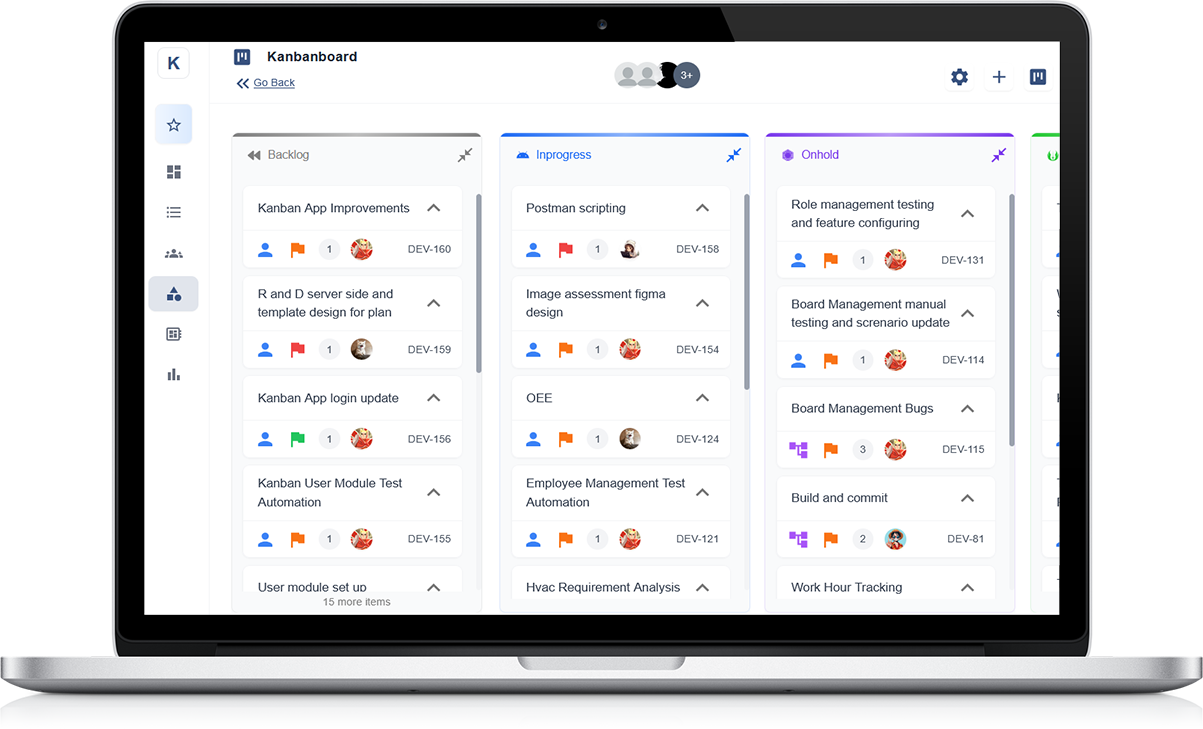
Kanban board software is a digital tool designed to help teams manage and visualise their workflow. It uses a simple, intuitive system of boards, lists, and cards to represent tasks, making it easier to track progress and manage work. The software provides a clear visual of the stages each task is in, allowing team members to focus on the most important priorities at any given moment.
Why Kanban Software is Crucial for Project Success
One of the key benefits of Kanban board software is its ability to streamline communication within teams. By visualising the entire workflow, it reduces the need for constant status updates and meetings. Team members can easily see what needs to be done, what’s in progress, and what has been completed, helping everyone stay on the same page.
Enhancing Workflow Efficiency
Kanban boards help identify bottlenecks in processes by making it clear where tasks are getting delayed. With this insight, teams can quickly adjust their workflow to ensure smooth project progression. By limiting the number of tasks that can be in progress at any one time, Kanban software also helps prevent overloading team members, improving overall efficiency.
Boosting Team Collaboration
Kanban software enhances team collaboration by providing a centralised space for everyone to update and review tasks. With real-time tracking, team members can collaborate more effectively, ensuring that tasks are completed on time and project goals are met.
Understanding Continuous Improvement in the Context of Project Management
What Does Continuous Improvement Mean?
Continuous improvement in project management refers to the ongoing effort to make small, regular enhancements to processes, tasks, and performance. Rather than making big, one-time changes, this approach focuses on steady progress that builds up over time. The aim is to work smarter, not harder, while increasing efficiency and quality in every project phase.
Why It Matters in Project Management
In today’s fast-paced work environment, projects must adapt quickly to new challenges. Continuous improvement helps project teams identify what works well and what needs refining. It supports better time management, resource use, and communication across departments. This approach helps reduce delays and cost overruns, while also boosting overall project success rates.
How to Apply Continuous Improvement
To put continuous improvement into action, teams should regularly review performance, gather feedback, and look for areas to streamline. Daily check-ins, end-of-project reviews, and progress meetings are great tools to encourage open discussion. These reviews help uncover problems early and allow adjustments before they grow into bigger issues.
Long-Term Benefits for Teams
By adopting continuous improvement, teams create a culture of learning and growth. It empowers staff to share ideas, take ownership of tasks, and strive for better results. Over time, this approach leads to stronger teamwork, more predictable project outcomes, and increased client satisfaction.
How Visual Workflows Boost Clarity and Efficiency
Understanding Visual Workflows
Visual workflows are a way of displaying tasks and processes in a clear, easy-to-follow format. They often use columns, cards, or flowcharts to show the steps needed to complete a task or project. This method helps team members see what needs to be done, who is responsible, and what stage each item is at.
Clarity for All Team Members
One of the main benefits of using visual workflows is improved clarity. Instead of relying on long emails or unclear instructions, everyone can view the same board and quickly understand their role. This reduces confusion, missed tasks, and the need for constant follow-ups. With everything laid out visually, it’s easier to keep work on track.
Increased Efficiency and Speed
Visual workflows allow teams to work more efficiently. By clearly mapping out tasks, team members can prioritise more effectively and avoid bottlenecks. It also helps identify delays early, so issues can be solved before they grow. The visual aspect keeps everyone focused and ensures smoother handovers between tasks.
Supporting Collaboration and Accountability
These systems encourage collaboration by keeping the whole team informed. When tasks are visible, it’s easier to share updates, track progress, and hold each other accountable. Over time, this leads to better teamwork, fewer mistakes, and faster results.
Limiting Work in Progress: Reducing Overload and Increasing Focus
What Is Work in Progress (WIP)?
Work in Progress refers to the number of tasks or projects that a person or team is handling at the same time. When WIP is too high, it can lead to confusion, delays, and stress. By setting limits on how many tasks can be worked on at once, teams can stay more focused and productive.
The Dangers of Multitasking
Multitasking might seem like a good way to get more done, but it often leads to lower quality work and longer completion times. Switching between tasks breaks concentration and increases the chance of errors. Limiting WIP encourages team members to complete one task before moving on to the next, resulting in better performance overall.
How WIP Limits Improve Focus
With clear WIP limits in place, individuals and teams can give each task the attention it needs. This helps reduce stress and improves the quality of output. When fewer tasks are in progress, it's easier to spot problems early, solve them quickly, and make steady progress without distractions.
Encouraging a Healthier Workflow
Setting WIP limits is not about doing less work—it's about working smarter. It encourages a smoother flow of tasks and keeps priorities in check. Over time, teams become more organised, deadlines are met more reliably, and the overall workload feels more manageable.
Real-Time Progress Tracking for Smarter Project Decisions
Why Real-Time Tracking Matters
In any project, staying up to date with what’s happening is key to making informed decisions. Real-time progress tracking allows teams to see exactly where tasks stand, what’s delayed, and what’s on schedule. This level of visibility helps managers respond quickly to changes and keep everything on track.
Better Decision-Making with Live Data
When project updates are available in real time, decisions are based on facts rather than guesses. Whether it's shifting resources, adjusting timelines, or solving unexpected issues, having current data ensures that actions taken are relevant and timely. This reduces the risk of costly mistakes or missed opportunities.
Improving Team Accountability and Communication
With live updates, everyone involved can see how their work fits into the bigger picture. It encourages ownership of tasks and opens up better communication. Teams can quickly identify where support is needed and collaborate to keep things moving forward.
Keeping Projects Aligned with Goals
Real-time tracking helps ensure that progress matches the overall project plan and objectives. If targets are not being met, early warnings allow for adjustments before bigger problems arise. This keeps the project aligned with its goals and improves the chances of successful completion.
Identifying Bottlenecks Early with Kanban Boards
Understanding Bottlenecks in Workflows
Bottlenecks happen when tasks pile up at a certain point in the process, causing delays and reducing efficiency. Spotting these issues early is crucial to keeping projects on schedule. Kanban boards offer a clear visual layout that makes it easier to see where work is slowing down.
Visual Clues to Watch For
On a Kanban board, each task moves through stages like "To Do", "In Progress", and "Completed". When too many tasks gather in one column, it often signals a blockage. This could mean a team member is overloaded or a specific process step needs improvement. With this real-time view, action can be taken quickly to resolve the issue.
Maintaining Steady Workflow
By regularly reviewing the flow of tasks, teams can balance workloads and avoid pushing too much work into one area. This keeps progress smooth and reduces stress. It also helps leaders plan resources more effectively and avoid last-minute rushes or missed deadlines.
Encouraging Continuous Improvement
Kanban boards support ongoing improvement by making workflow issues easy to spot and fix. Teams can reflect on what's causing delays and update their process to remove the root cause. Over time, this leads to better performance and stronger results across all projects.
Using Feedback Loops and Metrics to Drive Iteration
The Importance of Feedback in Project Management
Feedback loops play a key role in improving projects over time. They help teams learn from what’s working and what isn’t. Regular check-ins and reviews allow everyone to reflect on progress and suggest changes that lead to better results. This ongoing process supports smart, informed decision-making at every stage.
Tracking the Right Metrics
To improve performance, it’s important to measure progress with useful and relevant metrics. These can include task completion rates, cycle times, and team workload balance. By reviewing this data regularly, teams can identify patterns, delays, or areas where efficiency drops. Clear metrics make it easier to know when and how to make changes.
Making Adjustments Based on Results
Once feedback and data are gathered, the next step is to use that information to adjust plans. This could involve changing priorities, updating timelines, or shifting responsibilities. Small, frequent changes based on real-time insight keep projects moving in the right direction and reduce the risk of major issues later on.
Encouraging a Culture of Iteration
When teams are open to learning and adapting, they build a culture of continuous improvement. Feedback becomes a tool for growth rather than criticism. This helps build trust, boosts engagement, and keeps everyone focused on delivering the best outcomes possible.
How Kanban Supports Agile and Lean Continuous Improvement
Aligning with Agile and Lean Principles
Kanban naturally fits into both Agile and Lean methods by focusing on visual workflow, small changes, and constant improvement. It encourages teams to deliver work in smaller steps, respond quickly to changes, and focus on value. This supports an Agile mindset while reducing waste, which is a core Lean goal.
Visualising Work for Better Flow
One of the strengths of Kanban is its ability to make work visible. Each task is placed on a board and moved through columns like “To Do,” “In Progress,” and “Done.” This gives everyone a clear view of what’s happening and where things might be slowing down. Better visibility leads to faster decisions and fewer bottlenecks.
Encouraging Small, Ongoing Improvements
Kanban supports continuous improvement by promoting small, regular changes rather than large overhauls. Teams can use feedback and performance data to tweak their process, try new approaches, and keep getting better. This aligns with the Lean idea of ongoing progress and learning from results.
Improving Team Collaboration and Focus
With its simple structure, Kanban helps teams stay focused on current priorities. Limiting the amount of work in progress prevents overload and encourages finishing tasks before starting new ones. This shared focus improves collaboration and keeps everyone aligned on goals and outcomes.
Boosting Team Accountability Through Transparent Task Management
Creating Visibility Across the Team
Transparent task management allows everyone to clearly see what needs to be done, who is doing it, and when it is due. This visibility helps each team member understand their responsibilities and how their work contributes to overall goals. When tasks are visible, it becomes easier to spot delays or missed steps and take action quickly.
Encouraging Ownership and Responsibility
When tasks are clearly assigned and tracked, team members are more likely to take ownership. Knowing that others can see progress creates a natural sense of responsibility. Team members are more motivated to follow through on their tasks, meet deadlines, and support each other when needed.
Improving Communication and Follow-Up
Transparent task boards help teams communicate better. Everyone has access to the same information, which reduces confusion and keeps the team aligned. Updates, comments, and task progress can be shared in real time, making it easier to manage expectations and follow up on outstanding work.
Building a Culture of Trust and Performance
Transparency builds trust. When all tasks are visible, it shows that the team values openness and shared goals. This creates a supportive environment where people feel accountable not just to their tasks, but to each other. Over time, this leads to stronger performance and better teamwork.
Data-Driven Decisions: Leveraging Kanban Analytics and Reports
Understanding the Power of Data
Kanban analytics provide clear insights into how work flows through your team. By tracking data such as task completion times, lead times, and cycle times, you can identify patterns, highlight delays, and spot areas where performance can improve. This information forms the foundation for smarter, evidence-based decisions.
Measuring Team Efficiency
With built-in reports, teams can monitor how efficiently tasks move from start to finish. Charts and metrics make it easy to see which stages take the longest and whether workloads are evenly distributed. These insights help managers allocate resources better and remove blockers that slow progress.
Forecasting and Planning
Historical data helps with forecasting future work. Teams can use past trends to estimate how long similar tasks might take or how many tasks they can complete in a week. This allows for more accurate planning, improved delivery timelines, and better goal-setting across departments.
Continuous Improvement Through Regular Reviews
Regularly reviewing Kanban reports supports continuous improvement. By analysing what's working and what isn't, teams can refine processes, set realistic targets, and celebrate progress. Using data to support decisions ensures that changes are based on real performance, not guesswork.
How Kanban Encourages Daily Reviews and Incremental Improvements
Promoting Daily Team Check-Ins
Kanban boards naturally support daily reviews by offering a clear, visual overview of tasks. Teams can gather around the board each day to discuss progress, spot delays, and decide what needs attention. These short meetings help keep everyone aligned and focused on their goals.
Identifying Small Wins and Quick Fixes
By reviewing tasks daily, teams can quickly identify small issues before they become big problems. This enables faster decision-making and small changes that improve efficiency over time. Whether it’s adjusting workloads or reassigning a task, small actions lead to better outcomes.
Building a Culture of Ongoing Improvement
Daily reviews help create a mindset of continuous learning. Instead of waiting for large reviews at the end of a project, teams reflect daily and act on what they see. This steady rhythm of improvement encourages responsibility and teamwork, making it easier to adapt to change.
Making Performance Transparent
With all tasks visible on the board, it’s easy to see what’s working well and where help is needed. This openness builds trust and encourages honest conversations. It also motivates team members to keep improving their work and share suggestions that benefit the whole team.
Collaboration Made Simple: Keeping Everyone on the Same Page
Creating a Shared Understanding
Effective collaboration starts with clarity. When everyone has access to the same information, it's easier to understand tasks, deadlines, and priorities. A visual system helps team members quickly grasp what needs to be done and how their work connects with others.
Improving Communication Between Roles
Teams often include people from different departments or backgrounds. A clear and easy-to-use task board removes confusion and helps all roles stay connected. Whether it’s tracking progress or sharing updates, a shared tool keeps conversations focused and productive.
Reducing Repetition and Delays
When information is scattered, tasks can be duplicated or missed. With a visual system in place, team members can check what’s already been done and what’s coming next. This saves time and ensures that everyone works more efficiently, avoiding unnecessary steps.
Supporting Remote and On-Site Teams Alike
Collaboration tools help teams work together, even if they're not in the same location. With real-time updates and a clear structure, both remote and on-site staff can stay aligned. This makes it easier to handle tasks and respond quickly to any changes or new priorities.
Customising Kanban Workflows to Reflect Your Team’s Needs
Understanding Your Current Process
Before setting up a Kanban board, it’s important to look at how your team currently works. Identify the key stages each task goes through, from start to finish. This could include steps like planning, development, review, and completion. Knowing your existing flow helps build a system that mirrors your real work.
Creating Meaningful Columns
Each column on your Kanban board should represent a clear stage in your process. You can start simple with “To Do”, “In Progress”, and “Done”, then adjust as needed. Some teams may add columns like “Waiting for Approval” or “Blocked” to better reflect their unique workflow. The goal is to make it easy for everyone to see the status of any task.
Adding Tags and Task Types
To further customise your board, consider using colour-coded tags or labels. These can represent task types, urgency levels, or departments. This helps your team quickly scan and sort tasks based on what’s most important. Simple visual cues make the board more effective for daily planning.
Reviewing and Updating Regularly
Your Kanban board should grow with your team. As your process changes, update the board to match. Regular reviews help keep it relevant and useful. This way, your workflow always supports your team’s current needs and goals.
Examples of Continuous Improvement with Kanban in Real Projects
Improving Delivery Speed Through Workflow Visibility
One common way teams use Kanban for continuous improvement is by increasing the visibility of task progress. For example, a project team working on product updates noticed delays in the testing phase. By creating a separate column for “Testing”, they could clearly see when too many tasks were stuck there. This led them to adjust resources and reduce delays, improving delivery speed.
Reducing Bottlenecks by Limiting Work in Progress
Another project team used Kanban to manage marketing campaigns. They found that too many tasks were started at once, leading to poor quality and missed deadlines. By setting Work In Progress (WIP) limits on the “In Progress” column, they encouraged focus and reduced context switching. The result was a smoother flow and better output.
Enhancing Team Collaboration and Accountability
In a software team, Kanban helped improve team communication. Each member could clearly see who was working on what and what needed attention. This transparency led to quicker issue resolution and more shared ownership of tasks. Daily stand-ups became more focused, and team morale improved.
Learning from Metrics and Making Data-Driven Changes
Teams often track data like cycle time and throughput using Kanban. One team noticed their tasks were taking longer than expected. By reviewing metrics, they identified steps that added little value and removed them. This small change made a big difference in speed and consistency.
Scaling Kanban for Organisation-Wide Project Optimisation
Understanding the Benefits of Scaling Kanban
Kanban can be more than just a tool for small teams. When scaled properly across departments or entire organisations, it becomes a powerful system for aligning goals, streamlining work, and improving overall efficiency. With consistent visual workflows, teams can better manage shared projects, reduce delays, and respond faster to changes.
Creating a Unified Visual Framework
To scale Kanban effectively, it's important to set up a common structure that reflects how projects flow through different teams. This means defining shared stages such as “Planned”, “In Progress”, “Review”, and “Completed” while allowing space for team-specific needs. A unified board or connected boards can help track progress across departments without confusion.
Encouraging Cross-Department Collaboration
When all teams follow a similar Kanban approach, communication becomes smoother. Tasks can move seamlessly between teams, such as design to development or operations to support. This breaks down silos and creates a more collaborative environment where everyone understands their role in the bigger picture.
Using Metrics to Drive Strategic Improvement
At the organisation level, Kanban provides valuable performance data. Leaders can track trends in delivery times, bottlenecks, and workloads across teams. These insights help guide decisions, prioritise resources, and identify opportunities for continuous improvement.
Building a Culture of Transparency and Flexibility
Scaling Kanban also supports a culture where teams feel empowered and accountable. With clear visibility into progress and challenges, everyone is encouraged to contribute ideas, adapt quickly, and work towards shared goals.