Kanban boards are an essential tool for visualizing workflows and improving productivity in various environments. By organizing tasks and enhancing transparency, Kanban boards enable teams to better manage their time and resources.
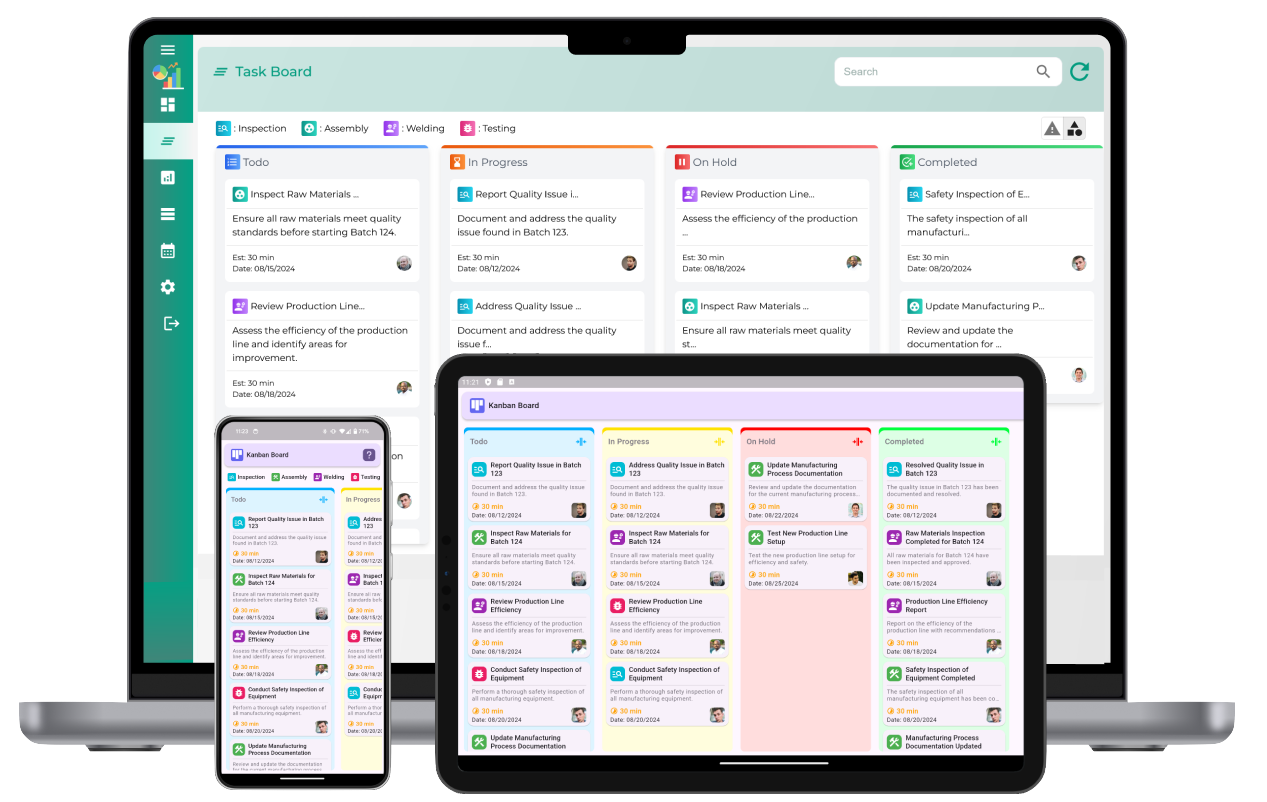
Understanding the Kanban Board
A Kanban board is a visual representation of tasks and their stages within a workflow. It typically consists of columns that represent different phases, such as “To Do,” “In Progress,” and “Completed.” Tasks are represented as cards that move across the columns as progress is made. The simplicity and flexibility of the Kanban board make it an effective tool for individuals and teams alike.
Benefits of a Kanban Board
Using a Kanban board offers numerous advantages for productivity:
- Enhanced Visualization: It provides a clear picture of the current workflow, making it easier to identify bottlenecks and prioritize tasks.
- Improved Task Management: Tasks are organized in a systematic way, ensuring that nothing is overlooked.
- Better Collaboration: Teams can easily see what others are working on, facilitating better communication and coordination.
- Focus on Continuous Improvement: The Kanban methodology encourages regular assessment and refinement of processes.
Setting Up a Kanban Board
To maximize productivity with a Kanban board, start by setting it up properly:
- Define Workflow Stages: Identify the stages of your workflow and create columns for each one. Common stages include “Backlog,” “To Do,” “In Progress,” and “Done.” Tailor these stages to suit your specific needs.
- Add Tasks as Cards: Write each task on a card and place it in the appropriate column. Include relevant details like deadlines and assignees to ensure clarity.
- Limit Work in Progress (WIP): Set a maximum number of tasks allowed in the “In Progress” column to avoid overloading team members and ensure focus on current priorities.
- Visual Cues: Use color-coding or tags to differentiate tasks by type, priority, or team member for quick identification.
Strategies to Boost Productivity
Here are some practical strategies to leverage a Kanban board for improved productivity:
1. Limit Work in Progress (WIP)
One of the core principles of Kanban is limiting the number of tasks in progress. This prevents overburdening individuals or teams and ensures that tasks are completed efficiently before moving on to new ones. Set realistic WIP limits based on the capacity of your team.
2. Prioritize Tasks Effectively
Use the Kanban board to prioritize tasks by importance and urgency. Tasks can be ranked within each column to ensure that the most critical items are addressed first. Regularly reassess priorities to adapt to changing needs.
3. Monitor Workflow Continuously
Keep an eye on the movement of tasks across the board. If tasks are stuck in a particular stage for too long, investigate and address the underlying issues. This ensures a smooth and efficient workflow.
4. Encourage Team Collaboration
Kanban boards are highly effective for team collaboration. Encourage team members to update the board regularly and communicate about task progress. This fosters accountability and transparency.
5. Utilize Feedback Loops
Schedule regular review meetings to discuss the progress displayed on the Kanban board. Use these sessions to gather feedback, identify areas for improvement, and make necessary adjustments to the workflow.
6. Analyze and Optimize
Periodically review the performance of your Kanban system. Use metrics like lead time and cycle time to measure efficiency. Identify patterns and make adjustments to enhance productivity further.
Common Mistakes to Avoid
While using a Kanban board is straightforward, there are common pitfalls to watch out for:
- Overloading the Board: Adding too many tasks can overwhelm the team and dilute focus.
- Ignoring WIP Limits: Allowing too many tasks in progress defeats the purpose of using a Kanban board.
- Lack of Updates: Failing to keep the board updated leads to confusion and inefficiency.
- Infrequent Reviews: Skipping regular reviews reduces the opportunity for continuous improvement.
Examples of Productivity Gains
Kanban boards have been used successfully in various contexts to improve productivity:
- Software Development: Teams use Kanban boards to track features and bugs, ensuring timely delivery of projects.
- Manufacturing: Kanban boards help optimize production schedules and resource allocation.
- Marketing: Campaigns and content creation are streamlined using clear workflows.
How to improve productivity with Kanban board
What is a Kanban board, and how does it improve productivity?
A Kanban board is a visual tool for managing tasks and workflows. It improves productivity by providing a clear overview of tasks, enabling teams to focus on priorities and streamline workflows.
How does visualizing tasks on a Kanban board enhance workflow?
Visualizing tasks helps teams see their current workload, identify bottlenecks, and manage task progress more effectively, leading to improved workflows.
What is the role of "To Do," "In Progress," and "Done" columns in productivity?
These columns organize tasks by status, making it easy to track progress and focus on completing tasks efficiently.
How does limiting work in progress (WIP) boost team efficiency?
Limiting WIP ensures that team members focus on completing current tasks before starting new ones, reducing multitasking and improving efficiency.
What are swimlanes on a Kanban board, and how do they help?
Swimlanes divide tasks into categories or teams, helping to organize work and ensure clarity in responsibilities.
How can color-coded tasks improve focus and prioritization?
Color-coding tasks based on priority, type, or deadlines helps teams quickly identify urgent work and allocate resources effectively.
What metrics can a Kanban board provide for improving productivity?
Metrics like cycle time, lead time, and cumulative flow diagrams help teams analyze performance and identify areas for improvement.
How does task prioritization on a Kanban board improve efficiency?
Prioritizing tasks ensures that high-impact work is completed first, improving overall team output and meeting deadlines effectively.
How can teams collaborate better using a Kanban board?
Kanban boards provide a shared visual workspace where teams can track progress, assign tasks, and communicate updates in real-time.
What is the role of regular reviews in improving Kanban board efficiency?
Regular reviews allow teams to assess workflow effectiveness, make adjustments, and resolve issues promptly.
How does tracking cycle time and lead time on a Kanban board improve productivity?
Tracking these metrics helps teams understand task durations, optimize workflows, and reduce delays in task completion.
Can a Kanban board help identify bottlenecks in a workflow?
Yes, a Kanban board highlights tasks that are stuck in certain stages, enabling teams to address bottlenecks quickly.
How do Kanban boards support continuous improvement?
Kanban boards encourage teams to regularly analyze workflows, implement changes, and enhance efficiency through incremental improvements.
What is the importance of maintaining a clean and organized Kanban board?
An organized board ensures clarity, prevents confusion, and helps teams focus on their priorities without unnecessary distractions.
How can Kanban boards be adapted to suit different team needs?
Kanban boards are flexible and can be customized with additional columns, labels, or swimlanes to align with specific workflows and team requirements.