TCard systems have long been a practical solution for task tracking and workflow management. By providing a clear visual representation of tasks, responsibilities, and progress, TCard boards simplify complex processes and enhance productivity. Free TCard software brings these advantages to digital platforms, offering businesses and individuals a cost-effective way to manage tasks without investing in expensive tools.
What is a TCard System?
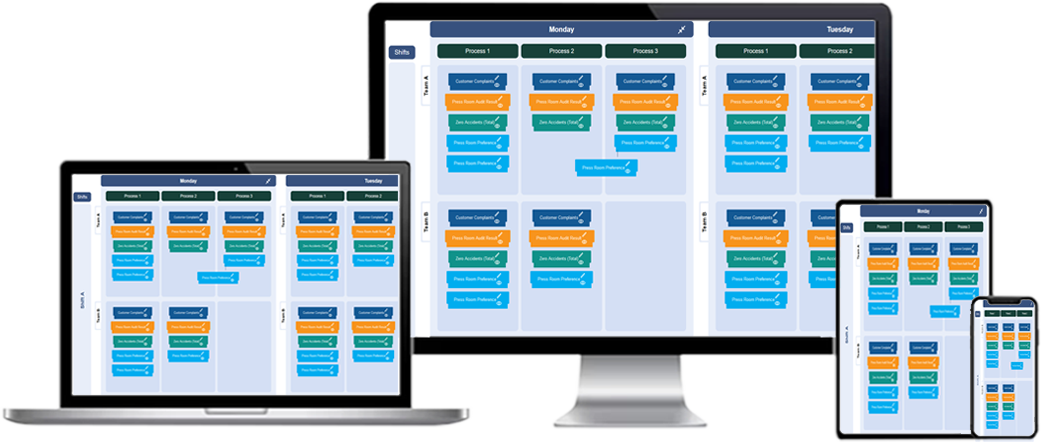
A TCard system is a visual management tool that uses individual cards to represent tasks, assignments, or work items. Each card contains relevant details about the task, such as a description, deadline, priority level, and assigned personnel. The cards are organized on a board that typically represents different stages of a process, such as “To Do,” “In Progress,” and “Completed.”
Free TCard software digitizes this process, allowing users to create and manage TCard boards online or through desktop applications. This digital transformation makes it easier to update, share, and maintain TCard systems in real time.
Benefits of Free TCard Software
1. Cost-Effective Task Management
Free TCard software eliminates the need for costly project management tools, making it accessible to startups, small businesses, and individual users. Despite being free, many platforms offer robust features that rival paid alternatives.
2. Enhanced Organization
With a TCard board, tasks are clearly organized into stages, making it easy to see the overall progress of a project. This visual clarity minimizes confusion and keeps teams aligned with their goals.
3. Improved Productivity
The simplicity of a TCard system encourages users to focus on one task at a time. By breaking down workflows into manageable steps, the software helps teams work more efficiently.
4. Real-Time Collaboration
Many free TCard tools include collaborative features that allow multiple users to update and manage boards simultaneously. This real-time access fosters better communication and teamwork.
5. Customization
Free TCard software often includes customizable templates and features, enabling users to tailor the system to their specific needs and workflows.
Key Features of Free TCard Software
1. Digital TCard Boards
The software provides virtual boards where users can create, edit, and move cards to represent the status of tasks. These boards mimic the simplicity of physical TCard systems while adding digital convenience.
2. Task Details
Each card can include detailed information such as task descriptions, deadlines, priorities, and notes. This ensures all relevant details are centralized and easy to access.
3. Drag-and-Drop Interface
Most free TCard software offers an intuitive drag-and-drop interface, making it simple to move tasks across different workflow stages.
4. Notifications and Alerts
To keep users informed, the software may include notifications for upcoming deadlines, task updates, or priority changes. This feature helps ensure nothing falls through the cracks.
5. Reporting and Insights
Some tools include basic reporting features, such as summaries of completed tasks or time spent on different workflow stages. These insights can help teams identify areas for improvement.
How to Implement Free TCard Software
1. Define Your Workflow
Start by identifying the stages of your workflow. Common stages include “To Do,” “In Progress,” and “Completed,” but you can customize these based on your process.
2. Set Up Your TCard Board
Using the software, create a new board and add columns for each workflow stage. Ensure the layout is clear and aligns with your team’s needs.
3. Create TCards
Input tasks as individual cards on the board. Include all relevant details, such as descriptions, deadlines, and assigned personnel, to ensure clarity.
4. Assign Responsibilities
Assign each task to a specific team member or department. This step ensures accountability and helps distribute workloads evenly.
5. Update Regularly
Keep the board updated as tasks progress through different stages. Regular updates ensure the board remains an accurate reflection of the project’s status.
6. Monitor and Optimize
Use any available reporting features to track performance and identify bottlenecks. Regularly review the system to ensure it meets your needs and make adjustments as necessary.
Best Practices for Using Free TCard Software
- Keep It Simple: Avoid overcomplicating the board with too many columns or details. Focus on the essentials.
- Update Consistently: Ensure all team members regularly update the board to reflect the current status of tasks.
- Encourage Collaboration: Involve the entire team in using the TCard system to foster better communication and engagement.
- Use Color Coding: Apply colors to cards to differentiate priority levels, task types, or team assignments for better visibility.
- Review Regularly: Periodically assess the board’s effectiveness and adjust workflows or processes as needed.
Free TCard software for task tracking
What is free TCard software, and how does it help with task tracking?
Free TCard software is a task and workflow management tool designed to help individuals and teams organize, prioritize, and track tasks effectively without cost.
Is free TCard software reliable for business use?
Yes, free TCard software can be reliable for small-scale task tracking, though it may lack advanced features available in paid versions.
What are the main features of free TCard software?
Common features include task creation, visual organization, basic customization, and the ability to move tasks between workflow stages.
Can free TCard software be used for team collaboration?
Yes, many free TCard tools support team collaboration with features like task assignments and shared access.
How does free TCard software simplify task prioritization?
It uses visual cues like color-coded cards or priority tags, making it easy to identify and focus on high-priority tasks.
Does free TCard software have customization options?
Most free TCard software includes basic customization, such as renaming columns, adding tags, or setting deadlines.
What limitations might exist in free TCard software?
Limitations often include fewer customization options, limited storage, lack of advanced analytics, and no integrations with other tools.
Can free TCard software be used offline?
Some free TCard software offers offline functionality, but most require an internet connection for real-time updates and collaboration.
How easy is it to set up free TCard software?
Free TCard software is usually straightforward to set up, with intuitive interfaces and quick onboarding processes.
Is free TCard software suitable for small businesses?
Yes, free TCard software is a great starting point for small businesses with basic task tracking and workflow management needs.
How secure is free TCard software for sensitive data?
Security levels vary, so it’s important to review the software’s data protection policies before storing sensitive information.
Can free TCard software handle multiple projects?
Many free TCard tools allow users to manage multiple projects, though some may impose limits on the number of projects or tasks.
Does free TCard software support reporting and analytics?
Basic reporting features may be available, but advanced analytics are typically found in paid versions.
What are the best use cases for free TCard software?
Free TCard software is ideal for personal task management, small team workflows, and simple project tracking.
How can a business upgrade from free to paid TCard software?
Most free TCard software offers an upgrade path with additional features, improved storage, and enhanced support options for a fee.