Free online T-card software provides an efficient solution for task and resource management, leveraging digital tools to replicate the simplicity of traditional T-card systems while adding enhanced features for collaboration and tracking. These systems are widely used across various industries, including manufacturing, logistics, healthcare, and education, for their ability to improve visibility and organization.
What Is T-Card Software?
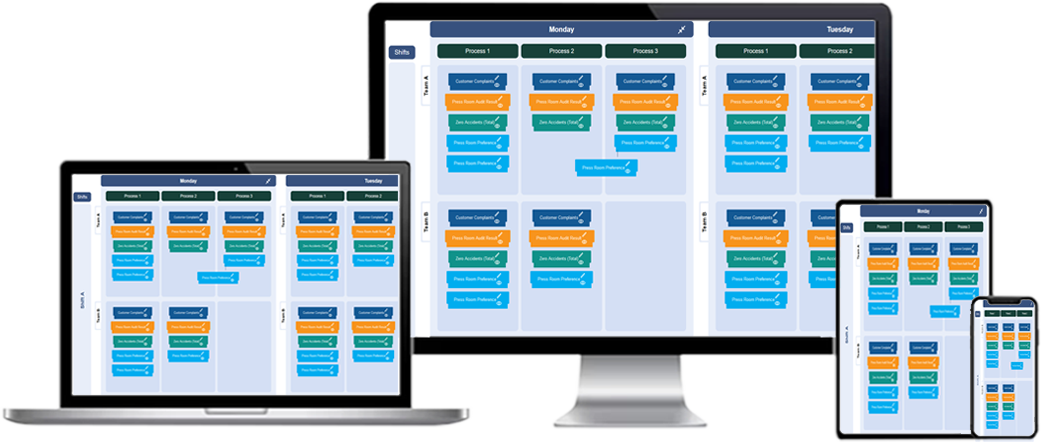
A T-card system is a visual task management tool originally implemented using physical cards slotted into racks. Each card typically represents a task, project, or resource. In its digital form, free T-card software replaces these physical components with online boards and cards that offer greater flexibility and advanced functionality. Users can easily create, update, and track tasks in real-time, ensuring smooth workflows and collaboration.
Core Features of Free Online T-Card Software
Free T-card software solutions may offer a range of features, including:
- Customizable Boards: Users can tailor boards to fit specific workflows, whether for task tracking, scheduling, or inventory management.
- Task Creation and Management: Create cards to represent individual tasks, complete with descriptions, deadlines, and assigned users.
- Drag-and-Drop Functionality: Easily move cards between columns to indicate progress or change task status.
- Real-Time Updates: Collaborators can view changes instantly, ensuring everyone stays aligned.
- Search and Filtering Options: Quickly locate specific cards or tasks using keywords or filters.
- Notifications and Alerts: Receive automatic reminders for approaching deadlines or overdue tasks.
Benefits of Using Free T-Card Software
Adopting a free T-card software solution offers numerous advantages, including:
- Cost-Effective: As a free tool, it eliminates the need for upfront investment, making it an accessible option for small businesses and teams.
- Improved Organization: T-card boards provide a visual overview of tasks, helping teams stay organized and identify bottlenecks.
- Collaboration Made Easy: Team members can collaborate seamlessly on shared boards, even when working remotely.
- Increased Flexibility: Digital systems are customizable, allowing users to adapt the software to suit specific needs or processes.
- Environmentally Friendly: Transitioning to a paperless T-card system reduces waste and supports sustainability initiatives.
Applications of Free T-Card Software
Free online T-card software can be used in various industries and scenarios:
- Manufacturing: Track production tasks, manage workflows, and monitor inventory levels.
- Project Management: Organize tasks, assign responsibilities, and visualize project timelines.
- Logistics: Manage shipments, monitor delivery schedules, and optimize fleet operations.
- Healthcare: Coordinate patient care, track medical inventory, and schedule staff shifts.
- Education: Plan lesson schedules, track student progress, and manage assignments.
How to Get Started with Free Online T-Card Software
To begin using a free online T-card solution, follow these steps:
- Choose a Platform: Select a reliable free T-card software provider that meets your requirements. Ensure it includes essential features such as customizable boards and real-time updates.
- Create an Account: Register on the platform and set up your profile.
- Design Your Board: Customize your T-card board to reflect your workflow. Add columns such as "To Do," "In Progress," and "Completed."
- Add Tasks: Create cards for individual tasks or projects, providing relevant details such as descriptions, deadlines, and assignees.
- Collaborate: Invite team members to your board and assign tasks to the appropriate individuals.
- Track Progress: Monitor the status of tasks as they move across the board. Use filters and search tools to locate specific cards.
Limitations of Free T-Card Software
While free T-card software offers numerous benefits, it may also have some limitations:
- Limited Features: Free versions may lack advanced capabilities such as analytics, integrations, or automation.
- User Restrictions: Some platforms impose limits on the number of users or boards in the free tier.
- Data Storage: Free software may offer limited storage capacity, requiring upgrades for larger projects.
Best Practices for Using T-Card Software
To maximize the benefits of your free T-card system, consider these best practices:
- Define Clear Objectives: Establish goals for your T-card system to ensure it aligns with your team’s needs.
- Regular Updates: Encourage team members to update cards regularly to maintain an accurate overview of progress.
- Leverage Customization: Take advantage of customization options to create workflows that align with specific projects or departments.
- Review Performance: Periodically review the board to identify bottlenecks or areas for improvement.
Future of T-Card Software
As technology continues to evolve, T-card software is expected to incorporate advanced features such as:
- Artificial Intelligence: AI-powered insights to predict potential delays and optimize workflows.
- Integration with Other Tools: Seamless connections with project management, communication, and ERP systems.
- Enhanced Mobility: Mobile-friendly platforms for task management on the go.
Free Online T-Card software: Quick, Easy and Free
What is free online T-Card software?
Free online T-Card software is a digital tool that replicates the traditional T-Card system, allowing users to manage tasks and workflows through a web-based platform without incurring any cost.
How does free online T-Card software work?
It works by providing a virtual board where users can create, move, and update T-Cards representing tasks. These cards are organized in columns or categories reflecting the stages of a workflow.
What are the features of free online T-Card software?
Features often include drag-and-drop functionality, task categorization, basic reporting, notifications, and the ability to collaborate in real time with team members.
How is free online T-Card software different from paid versions?
Free versions typically offer limited features, storage, and integrations, while paid versions provide advanced analytics, customization, and support for larger teams or more complex workflows.
Can free online T-Card software be used for team collaboration?
Yes, most free online T-Card software allows basic team collaboration features, such as assigning tasks, sharing updates, and commenting on cards.
What are the benefits of using free online T-Card software?
Benefits include cost savings, improved task visibility, centralized task management, and ease of access from any device with an internet connection.
Is free online T-Card software suitable for all industries?
Yes, it can be adapted to suit industries like manufacturing, education, healthcare, and project management, as long as the required features align with the organization’s needs.
How secure is free online T-Card software?
While most free T-Card software providers ensure basic security measures, it’s important to check their data protection policies to ensure sensitive information is secure.
Can free online T-Card software support multiple projects?
Yes, some free tools allow users to manage multiple projects by creating separate boards or categories for each project.
Does free online T-Card software offer task tracking features?
Yes, task tracking features are usually included, enabling users to monitor progress, deadlines, and task ownership visually.
What are the limitations of free online T-Card software?
Limitations may include restricted storage, limited team size, fewer integrations, and less customization compared to paid options.
Is free online T-Card software user-friendly?
Most free T-Card software is designed to be user-friendly with intuitive interfaces and simple navigation, making it accessible even for beginners.
Can free online T-Card software be customized?
Basic customization is usually available, such as renaming columns, adding labels, or changing card colors, though advanced customization is often reserved for paid plans.
How can free online T-Card software improve task management?
It improves task management by offering a centralized platform for organizing tasks, visualizing workflows, and ensuring accountability among team members.
What are the steps to set up free online T-Card software?
Steps include signing up for an account, creating a board, setting up columns to represent workflow stages, adding tasks as cards, and assigning them to team members.