Kanban boards are widely used for managing workflows, ensuring productivity, and increasing efficiency in various types of organizations. These tools, traditionally seen in manufacturing, have found their place in a broad range of industries, including software development, project management, and personal task management. The beauty of Kanban lies in its simplicity and adaptability. Free online Kanban tools offer a cost-effective way for individuals and teams to implement this visual task management technique without any initial financial commitment.
What is a Kanban Tool?
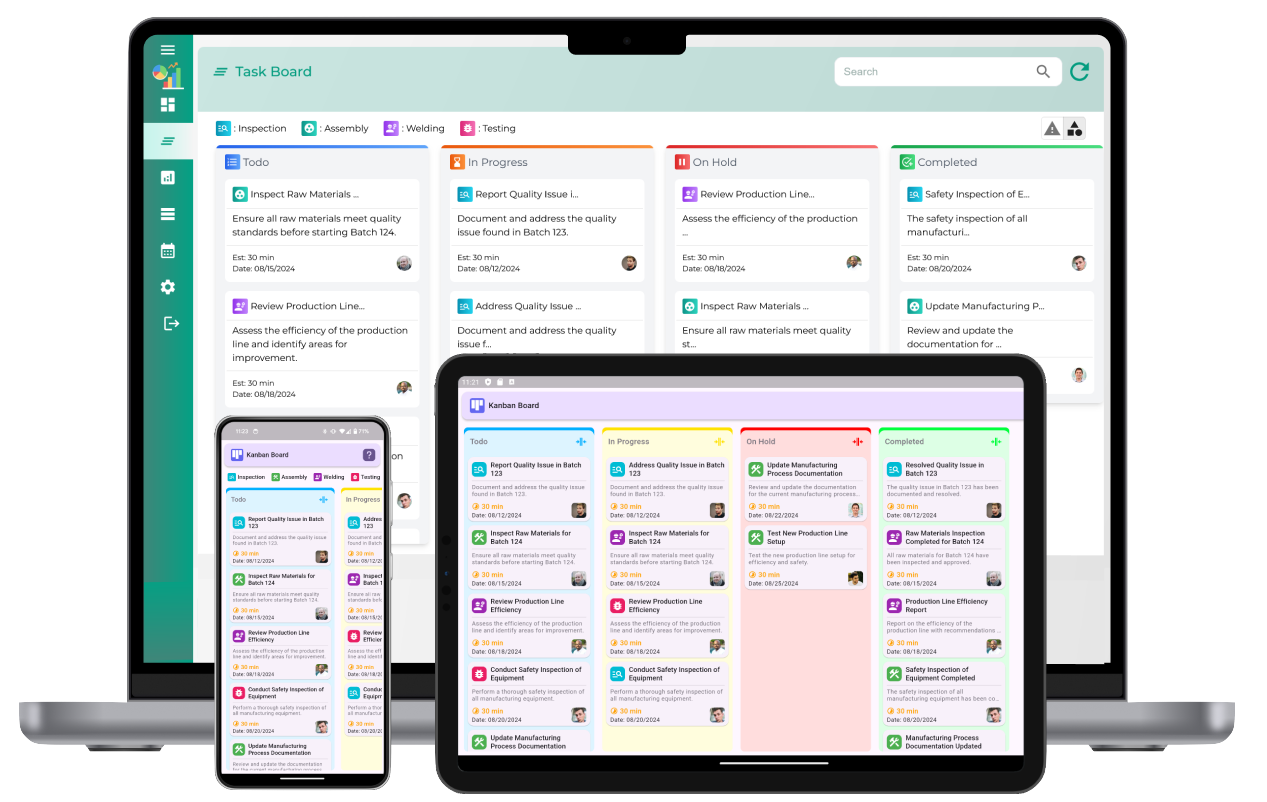
A Kanban tool is a digital representation of the Kanban methodology, which is a visual system used for managing tasks and workflows. A Kanban board typically consists of columns representing different stages of a workflow, such as "To Do," "In Progress," and "Done." Tasks, represented as cards or sticky notes, are moved across these columns as they progress through each stage. The objective of using a Kanban board is to provide clarity on task status, limit work-in-progress, and optimize flow.
Why Use Free Online Kanban Tools?
Free online Kanban tools allow users to leverage the benefits of visual project management without the upfront costs of purchasing software. Whether you are a small business, freelancer, or team just starting out, free Kanban tools provide access to powerful features that can help you manage tasks, track progress, and collaborate with others. These tools often offer cloud-based access, making them convenient and accessible from any device with an internet connection. Furthermore, many free Kanban tools provide integrations with other popular productivity tools, allowing for a more seamless workflow.
Key Features of Free Online kanban Tools
- Customizable Boards: Free Kanban tools allow you to create boards that fit your specific project requirements. You can define your columns, name them according to your workflow, and adjust the settings to meet your needs.
- Task Management: Tasks can be added as cards on your board. Each card typically includes a description, due date, priority level, and the team member responsible for completing it.
- Drag-and-Drop Functionality: Tasks can be moved easily from one stage to another using a drag-and-drop feature. This visual approach provides instant clarity on task progress.
- Collaboration Tools: Many free Kanban tools offer collaboration features such as comments, file attachments, and notifications. This helps teams stay on the same page, share updates, and ensure nothing falls through the cracks.
- Real-Time Updates: Changes made to the board are instantly visible to all users, allowing for seamless collaboration and immediate feedback.
- Integrations: Some free Kanban tools offer integrations with other productivity tools, such as email, time tracking, and communication platforms. This enhances efficiency and streamlines workflow management.
- Analytics and Reporting: Free tools often come with basic reporting and analytics features that allow you to track task completion, progress, and overall team performance.
Top Benefits of Using Free Online kanban Tools
- Cost-Effective: One of the most significant advantages of free Kanban tools is that they allow users to take full advantage of task management features without spending a dime.
- Increased Productivity: The visual nature of Kanban boards helps you stay focused on what needs to be done. By limiting the number of tasks in progress and breaking them down into manageable chunks, teams can work more efficiently.
- Improved Collaboration: Free online Kanban tools often support multiple users, making it easy for teams to collaborate. Team members can add comments, attach files, and update task statuses in real time, ensuring everyone is on the same page.
- Better Workflow Transparency: Having a visual representation of the entire workflow allows teams to quickly spot bottlenecks and areas that need attention. This transparency makes it easier to prioritize tasks and optimize processes.
- Easy to Learn and Use: The simplicity of Kanban boards means that they are easy to learn and use, even for those with little to no project management experience.
How to Choose the Right Free Online kanban Tool
When choosing a free Kanban tool, consider the following factors:
- Ease of Use: Look for a tool that is intuitive and user-friendly. A complicated tool can slow down productivity, especially for teams new to Kanban methodology.
- Customization Options: Depending on your needs, you might want a tool that allows you to create custom workflows and boards. Some tools offer flexible templates that can be adjusted to fit your specific requirements.
- Collaboration Features: If you're working in a team, ensure the tool has strong collaboration features such as shared boards, task assignment, file sharing, and comment threads.
- Integrations: Check if the tool integrates with other tools you use. For example, integrations with communication platforms, calendar apps, or time tracking software can streamline your workflow.
- Limitations of Free Plan: While most free Kanban tools offer a solid set of features, some may come with limitations such as a restricted number of boards, tasks, or users. Make sure the free plan meets your needs before committing to a tool.
Popular Free kanban Tools for Task and Workflow Management
There are numerous free Kanban tools available, each offering its unique set of features and benefits. Some tools may focus on simplicity, while others offer more advanced features like integrations and reporting. Regardless of your specific needs, there is a free Kanban tool suitable for you. Here are some popular options to consider:
- Tool A: Known for its simple, drag-and-drop interface, this tool allows users to create boards and move tasks through different stages easily. It's ideal for personal use or small teams.
- Tool B: Offers a more feature-rich solution with collaboration tools, task assignments, and file attachments. Its advanced reporting features make it suitable for teams seeking to track productivity.
- Tool C: A lightweight Kanban tool perfect for freelancers or small businesses. It provides essential features such as task management, customizable columns, and integrations with third-party tools.
Free Online kanban Tools
What are free online Kanban tools?
Free online Kanban tools are digital platforms that use the Kanban method for task and project management. They help visualize workflows through columns (e.g., To Do, In Progress, Completed) and provide a simple, intuitive way to track tasks without cost.
What are the benefits of using free Kanban tools?
Free Kanban tools offer many benefits, including improved organization, task visualization, easy team collaboration, and the ability to track work progress. They also provide a cost-effective solution for individuals and small teams to manage projects efficiently.
How do I get started with free online Kanban tools?
To get started, you typically need to sign up for an account on the Kanban tool's website. After that, you can create boards for your projects, customize workflows, add tasks, and invite team members to collaborate in real time.
Can free online Kanban tools be customized for different workflows?
Yes, most free Kanban tools allow you to customize boards to fit your specific workflows. You can create custom columns, add labels, set task priorities, and even integrate different stages of your project to match your team’s needs.
Are free Kanban tools suitable for small teams?
Yes, free Kanban tools are well-suited for small teams. They provide essential features for collaboration, task management, and tracking progress while keeping costs low, making them a great option for small teams or individuals just starting out.
What features do free online Kanban tools typically offer?
Free online Kanban tools typically offer features such as task creation, drag-and-drop task movement, customizable workflows, due date tracking, team collaboration options, and basic reporting tools. Advanced features might be available in paid versions.
Can I collaborate with my team using free Kanban tools?
Yes, collaboration is a key feature of free Kanban tools. You can invite team members to boards, assign tasks, leave comments, and share files, all in real time, improving communication and productivity across the team.
Do free Kanban tools support mobile access?
Many free Kanban tools offer mobile access via apps or responsive websites. This allows you to manage tasks, track progress, and collaborate with your team while on the go, ensuring productivity regardless of location.
Can I integrate free online Kanban tools with other tools?
Yes, some free Kanban tools allow integration with other tools, such as email services, file storage platforms, or communication tools. Integration options may be more limited in free versions compared to paid plans.
Are there limitations to using free online Kanban tools?
Yes, free online Kanban tools often come with limitations such as fewer features, fewer board or task limits, or limited integrations with other tools. These limitations can be overcome by upgrading to a paid version, but the free versions are often sufficient for small-scale projects.
How do free Kanban tools help improve task management?
Free Kanban tools help improve task management by providing a visual representation of work, making it easier to see tasks that need attention. This helps prioritize work, track progress, reduce bottlenecks, and keep teams organized and on track.
How secure are free online Kanban tools?
Free online Kanban tools typically use encryption and other security measures to protect data. However, security features may vary depending on the provider. It’s important to review their privacy policies and ensure they meet your security requirements before use.
Can I use free Kanban tools for personal productivity?
Yes, free Kanban tools are excellent for personal productivity. You can use them to track tasks, organize to-do lists, and prioritize activities, allowing for a more structured and efficient approach to managing your daily responsibilities.
What kind of reporting and analytics do free Kanban tools offer?
Many free Kanban tools offer basic reporting features, such as task completion rates, cycle time, or the ability to track overdue tasks. Advanced reporting features may be available in paid versions, but the free versions still provide valuable insights into task management.
How do free Kanban tools handle task prioritization?
Free Kanban tools allow task prioritization through customizable labels, color coding, and due dates. You can assign priority levels to tasks, sort tasks by importance, and ensure that high-priority work is tackled first by arranging tasks accordingly on the board.