A Free Online Kanban Board is a tool designed to facilitate task management and workflow organization through a visual and interactive interface. It is particularly popular in agile project management and helps teams visualize the flow of tasks from initiation to completion. The concept behind a Kanban board is straightforward yet powerful, leveraging columns to represent different stages in a process and cards to represent individual tasks.
What is a Kanban Board?
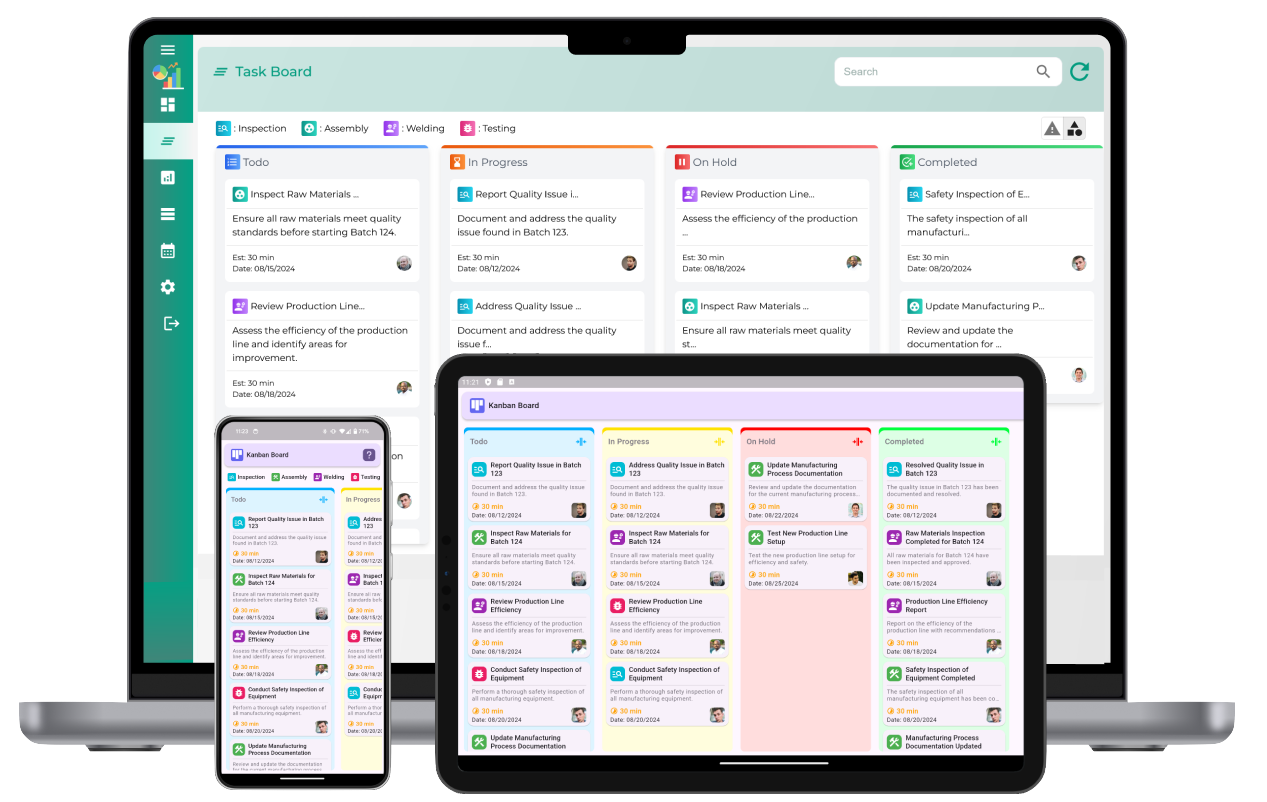
A Kanban board is a visual tool that helps teams track and manage work through various stages of a workflow. The board is divided into columns, with each column representing a stage in the process, such as "To Do," "In Progress," and "Completed." Tasks are represented by cards that move from one column to the next as work progresses. This visual approach helps teams manage work efficiently, ensure transparency, and identify bottlenecks in the workflow.
Key Features of Free Online Kanban Boards
Free online Kanban boards offer various features that make them effective for task and project management. These features include:
- Drag and Drop Interface: Users can easily move tasks from one stage to another with a simple drag-and-drop action. This helps teams quickly adjust priorities and visualize progress.
- Customizable Columns: Kanban boards can be customized to suit different workflows, from simple task tracking to complex project management. Users can add or remove columns based on their specific needs.
- Task Cards: Each task or work item is represented by a card on the board. These cards can include detailed information such as task names, due dates, priorities, assignees, and additional notes or attachments.
- Real-Time Collaboration: Multiple team members can access the Kanban board simultaneously, making it ideal for collaboration. Updates made by one user are reflected in real time, ensuring that everyone is on the same page.
- Notifications: Free online Kanban boards often include notifications to alert team members when tasks are updated, moved, or completed. This ensures that important changes are communicated to everyone involved.
- Integration with Other Tools: Many free Kanban boards allow integrations with other tools, such as email, calendars, and cloud storage services. This enhances workflow management by keeping everything in one place.
Benefits of Using Free Online Kanban Boards
Using a free online Kanban board for task and project management offers several advantages:
- Visual Clarity: Kanban boards provide a clear, visual representation of the workflow, making it easy for teams to track progress and identify potential issues. This reduces confusion and ensures that everyone is aware of their responsibilities and deadlines.
- Improved Workflow Efficiency: By visualizing tasks and their stages, teams can identify bottlenecks and areas for improvement. This allows for better prioritization and allocation of resources, resulting in more efficient workflows.
- Increased Collaboration: With real-time updates and multiple team members able to access the board at once, collaboration becomes more streamlined. Team members can easily communicate and share updates without needing to rely on emails or meetings.
- Easy to Use: Free online Kanban boards are typically designed to be user-friendly, requiring minimal training or setup. This makes them accessible to teams of all sizes and experience levels.
- Cost-Effective: As the name suggests, free online Kanban boards are available at no cost, making them an excellent option for small businesses, startups, and individual projects. They provide robust features without the financial burden of purchasing expensive software.
How to Use a Free Online Kanban Board?
Using a free online Kanban board is a straightforward process that can be broken down into a few simple steps:
- Create an Account: To get started, you'll need to create an account on a platform that offers free online Kanban boards. Many of these platforms provide free tiers with basic features, while others may offer premium options with advanced functionality.
- Create a Board: Once logged in, create a new Kanban board for your project or workflow. You can customize the board's columns to fit your needs, such as "To Do," "In Progress," and "Completed," or create additional stages like "Backlog" or "Review."
- Add Tasks: After setting up your columns, you can start adding tasks to the board. Each task should be represented by a card that includes relevant information, such as the task description, due date, assignee, and priority.
- Move Tasks Across the Board: As work progresses, move tasks from one column to another. For example, once a task is started, move it to the "In Progress" column. When it is completed, move it to the "Completed" column. This helps visualize progress and keeps everyone informed.
- Collaborate and Track Progress: Team members can update task cards with comments, attachments, and progress updates. This ensures that everyone is on the same page and that important information is easily accessible.
- Monitor the Board: Regularly check the Kanban board to ensure that tasks are moving smoothly through the workflow. If any bottlenecks or issues arise, take action to resolve them and keep the project on track.
Best Practices for Using a Kanban Board
To get the most out of your free online Kanban board, consider the following best practices:
- Limit Work in Progress (WIP): One of the core principles of Kanban is limiting the number of tasks that are being worked on at any given time. This helps prevent overloading team members and ensures that tasks are completed before new ones are started.
- Prioritize Tasks: Ensure that the most important tasks are placed at the top of the board or in a designated priority column. This ensures that the team focuses on the highest-value work first.
- Regularly Update the Board: Keep the board updated with the latest task status and information. This helps everyone stay informed and ensures that the board accurately reflects the current state of the project.
- Review the Board Periodically: Hold regular reviews of the Kanban board to evaluate progress, identify potential issues, and adjust workflows as needed. This helps keep the project on track and allows for continuous improvement.
- Communicate Effectively: Use the Kanban board as a tool for communication within the team. Encourage team members to comment on task cards, share feedback, and keep everyone updated on their progress.
Free Online Kanban board
What is a free online Kanban board?
A free online Kanban board is a digital tool that allows users to visually manage tasks and workflows by organizing them into columns and moving them through different stages, such as "To Do," "In Progress," and "Done."
How does a free online Kanban board work?
A free online Kanban board works by providing a visual layout where users create task cards that represent individual tasks. These cards can be moved between columns to show the current status of the task, providing a clear view of the workflow.
What are the benefits of using a free online Kanban board?
The benefits include improved task visibility, easier collaboration, better task tracking, increased workflow efficiency, and the ability to manage multiple tasks and projects at once, all in a visually intuitive format.
Can a free online Kanban board be used for team collaboration?
Yes, a free online Kanban board is an excellent tool for team collaboration. It allows multiple users to update and track the progress of tasks in real-time, ensuring everyone stays informed and aligned with the project goals.
Is a free online Kanban board customizable?
Yes, many free online Kanban boards offer customization options such as adding or removing columns, changing card colors, and adapting the board to match specific workflows and project requirements.
How can a free online Kanban board help with task management?
A free online Kanban board helps by providing a clear, visual representation of tasks, allowing users to break tasks into smaller components, prioritize them, and track their progress as they move through different stages.
Is it possible to track project progress with a free online Kanban board?
Yes, by moving tasks across columns, you can visually track the progress of a project. You can see which tasks are complete, which ones are in progress, and which ones still need attention, providing an at-a-glance overview of project status.
What features should I look for in a free online Kanban board?
Key features to look for include drag-and-drop task management, real-time collaboration, customizable workflows, task labeling, color coding, and the ability to add deadlines and comments to tasks.
Can I integrate a free online Kanban board with other tools?
Yes, many free online Kanban boards offer integrations with other tools such as calendars, email, project management apps, and file-sharing systems, making it easy to sync information across platforms.
How secure is a free online Kanban board for managing sensitive information?
Security varies by platform, but most free online Kanban boards include features like password protection, encrypted communication, and user access controls to ensure sensitive data is kept secure.
Can I manage multiple workflows with a free online Kanban board?
Yes, free online Kanban boards often allow you to create multiple boards for different projects or workflows, helping you organize and manage various tasks separately while keeping everything under control.
Are there any limitations with using a free online Kanban board?
Some limitations may include restrictions on the number of users, tasks, or boards, limited customization options, and fewer advanced features like reporting or analytics in the free version.
How can a free online Kanban board help prioritize tasks?
A Kanban board helps prioritize tasks by allowing you to categorize tasks, assign priorities, and move them between columns based on their urgency or importance, ensuring critical tasks are completed first.
Is a free online Kanban board suitable for project management?
Yes, a free online Kanban board is ideal for project management, as it provides a simple and visual way to track project progress, manage resources, and collaborate with team members in an organized manner.
How easy is it to set up and start using a free online Kanban board?
Most free online Kanban boards are very easy to set up, with simple registration and an intuitive interface. You can start by creating tasks and organizing them into different columns to match your workflow.