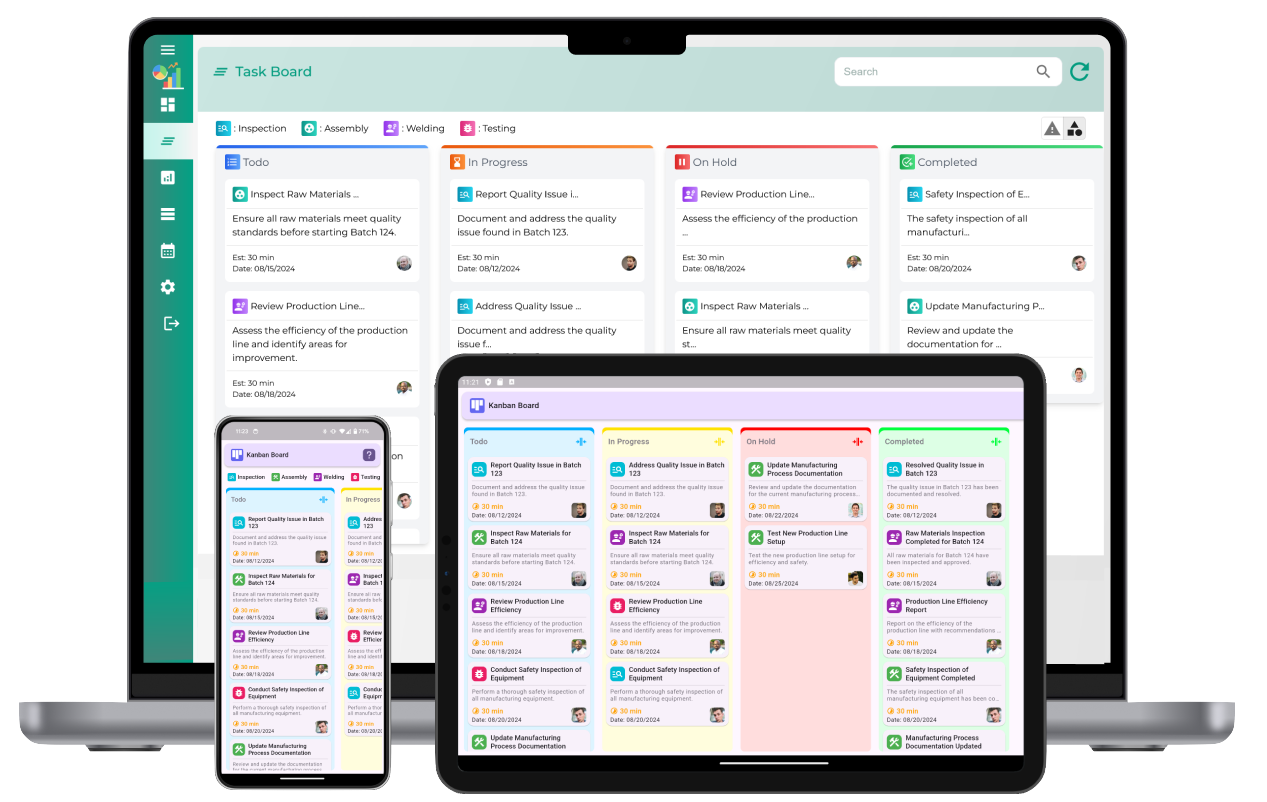
A customizable Kanban board online is an essential tool for teams looking to improve their task management, streamline workflows, and increase productivity. This digital version of the traditional Kanban board provides the flexibility to adapt to various project needs and workflows. By allowing teams to create and modify boards, columns, and task cards, it ensures that every project is organized in the most efficient manner.
What is a Customizable Kanban Board?
A customizable Kanban board is a visual tool used to manage and track tasks within a project or workflow. Unlike a traditional static board, an online customizable Kanban board provides users with the ability to adapt the layout and design according to the unique needs of their team. Users can create multiple boards, add columns to represent different stages of a project, and adjust workflows by adding, moving, and editing task cards. This customization ensures that the board reflects the specific goals, workflows, and progress tracking required for each project.
Features of a Customizable Kanban board Online
The core feature of any customizable Kanban board is its flexibility. The following are some key features typically offered by online customizable Kanban boards:
- Drag-and-Drop Functionality: Users can easily move task cards between different columns using a simple drag-and-drop interface. This allows for quick updates and clear visual representation of progress.
- Customizable Columns: Columns can be customized to reflect different stages in a project’s workflow, such as "To Do," "In Progress," and "Done." Teams can add new columns for more specific steps in the process, like "Under Review" or "Waiting for Approval."
- Color-Coding and Tags: Task cards can be color-coded or tagged based on priority, deadlines, or categories. This visual distinction helps team members prioritize tasks and identify important work at a glance.
- Task Cards with Details: Each task card can include a variety of details such as descriptions, assignees, due dates, attachments, and checklists. This ensures that each task has all the necessary information for completion.
- Collaboration and Comments: Team members can leave comments, attach files, and provide updates on task cards. This fosters collaboration, allowing team members to discuss issues, share insights, and keep each other informed.
- Progress Tracking and Analytics: Many customizable Kanban boards provide built-in analytics tools to track team performance, such as task completion rates, cycle times, and bottlenecks. This data can help teams identify areas for improvement and optimize their workflows.
Benefits of Using a Customizable Kanban board
There are several advantages to using an online customizable Kanban board for task and project management:
1. Flexibility to Fit Any Workflow
One of the most significant benefits of a customizable Kanban board is its adaptability. Teams can design the board according to their specific workflow needs. Whether the team is working on software development, marketing campaigns, or product management, they can tailor the board to reflect the exact stages, processes, and tasks they need to track. This flexibility ensures that the tool aligns perfectly with the team's project goals, improving efficiency and clarity.
2. Increased Collaboration
A customizable Kanban board promotes collaboration by allowing all team members to contribute to the board. Whether adding new tasks, updating progress, or providing feedback, team members can actively participate in the management process. The ability to leave comments on individual tasks fosters communication and ensures everyone is on the same page, reducing misunderstandings and keeping work flowing smoothly.
3. Visual Clarity and Transparency
Visualizing the workflow through a Kanban board allows everyone involved to quickly understand the status of tasks. The simple, intuitive design provides clear visibility of tasks at each stage, which helps team members stay on top of their responsibilities. Customizing the board to suit different processes and stages can further improve clarity, making it easier to identify bottlenecks, delays, and areas requiring attention.
4. Enhanced Productivity
With a customizable Kanban board, teams can easily organize tasks by priority, deadlines, and categories. This reduces the time spent on manual tracking and provides team members with clear, actionable instructions. The visual nature of the board helps team members stay focused on what needs to be done and ensures that tasks are completed efficiently. As tasks progress from one column to the next, team members feel a sense of accomplishment, boosting motivation and productivity.
5. Continuous Improvement
Using a customizable Kanban board provides valuable insights into a team’s workflow, allowing managers to identify areas for improvement. By tracking performance metrics such as cycle times and bottlenecks, teams can make data-driven decisions to optimize their processes. Whether adjusting workflows, reallocating resources, or refining task assignments, teams can continuously enhance their performance over time.
Best Practices for Using a Customizable Kanban board
To fully maximize the benefits of a customizable Kanban board, teams should follow best practices that ensure effective implementation and use:
- Set Clear Workflow Stages: Define clear and concise stages in your workflow to represent the different phases of a task’s lifecycle. This ensures that tasks are properly categorized and tracked, minimizing confusion.
- Limit Work in Progress (WIP): To maintain focus and avoid overwhelm, limit the number of tasks that can be in each stage at a given time. This ensures that tasks are completed before new ones are started, reducing multitasking and increasing efficiency.
- Regularly Update the Board: Ensure that team members update the board regularly to reflect the current status of tasks. This prevents the board from becoming outdated and helps maintain accurate tracking of progress.
- Use Color-Coding Effectively: Color-code tasks based on priority, deadlines, or categories to make the board easier to read. This allows team members to quickly assess which tasks require attention.
- Review Analytics and Make Adjustments: Use the analytics and performance metrics provided by the Kanban board to assess team performance. Regularly review the board to identify areas for improvement and make necessary adjustments to the workflow.
Customizable Kanban board online
What is a customizable Kanban board?
A customizable Kanban board is a visual task management tool that allows you to tailor the layout, columns, and workflow to fit your specific needs. It helps organize tasks, track progress, and streamline team collaboration by visualizing tasks in different stages of completion.
How do customizable Kanban boards work online?
Customizable Kanban boards work online by providing a digital platform where tasks can be created, moved, and tracked in real time. You can customize the board to include columns for various stages of a project, assign tasks, and collaborate with team members, all from a cloud-based interface.
What are the benefits of using a customizable Kanban board online?
The benefits of using a customizable Kanban board online include flexibility to tailor workflows, easy access for remote teams, real-time collaboration, improved task visibility, better tracking of progress, and increased efficiency in managing projects and tasks.
How can I customize my Kanban board for specific workflows?
You can customize your Kanban board by adjusting the columns to reflect the unique stages of your workflow, such as "To Do," "In Progress," "Testing," and "Done." You can also set up color coding, add labels, and prioritize tasks to match the needs of your team or project.
What features should I look for in a customizable online Kanban board?
Look for features like drag-and-drop task management, column customization, real-time updates, task labels and color coding, progress tracking, team collaboration tools (e.g., comments, file sharing), and integration with other project management tools or software.
Can I add or remove columns on a customizable Kanban board?
Yes, one of the main advantages of a customizable Kanban board is the ability to add, remove, or modify columns according to your needs. This allows you to tailor the board to your specific project requirements and workflow stages.
How can I set priorities using a customizable Kanban board online?
You can set priorities on a customizable Kanban board by color coding tasks, adding priority labels (e.g., High, Medium, Low), or sorting tasks by their due date or importance. This helps the team focus on the most critical tasks first.
Is it possible to collaborate with a team using an online customizable Kanban board?
Yes, online customizable Kanban boards are designed to promote team collaboration. Team members can view, update, and comment on tasks in real time, ensuring smooth communication and task tracking across different locations and time zones.
How do I integrate other tools with my customizable Kanban board?
You can integrate other tools with your customizable Kanban board by using built-in integrations or APIs. Popular integrations may include linking with calendars, time tracking software, communication tools, or cloud storage for file sharing.
Can I track task progress with a customizable Kanban board online?
Yes, a customizable Kanban board allows you to track task progress by moving tasks through columns, such as "To Do," "In Progress," and "Done." You can also visualize progress using metrics like the number of tasks completed, or the average time spent per task.
How does a customizable Kanban board improve team collaboration?
A customizable Kanban board improves team collaboration by making all tasks visible and ensuring everyone can see the status of work in real time. Team members can easily update tasks, communicate with each other through comments, and share relevant files directly within the board.
Can I track time or deadlines with a customizable Kanban board?
Yes, you can track time or deadlines on a customizable Kanban board by setting due dates for tasks and using time-tracking features if available. You can also set reminders and alerts to ensure tasks are completed on time.
How can I manage multiple projects with an online customizable Kanban board?
Managing multiple projects is easy with an online customizable Kanban board as you can create separate boards for each project or use a single board with multiple workflows for different projects. This helps organize tasks by project, while still providing an overview of all ongoing work.
Is it easy to update and move tasks on a customizable Kanban board online?
Yes, it is easy to update and move tasks on a customizable Kanban board online. Tasks can be moved by simply dragging and dropping them between columns, making it a quick and intuitive way to update their status. Additionally, you can add comments or attachments to tasks as needed.
How does a customizable Kanban board help with task prioritization?
A customizable Kanban board helps with task prioritization by allowing you to arrange tasks in order of importance, set due dates, or use labels and colors to indicate priority. This ensures that high-priority tasks are always addressed first and completed efficiently.