Kanban boards are an essential tool for workflow management, helping teams visualize tasks, streamline processes, and enhance efficiency. By using an online Kanban board, teams can collaborate in real-time, track progress, and improve productivity without the limitations of physical boards.
1. Understanding Kanban Boards
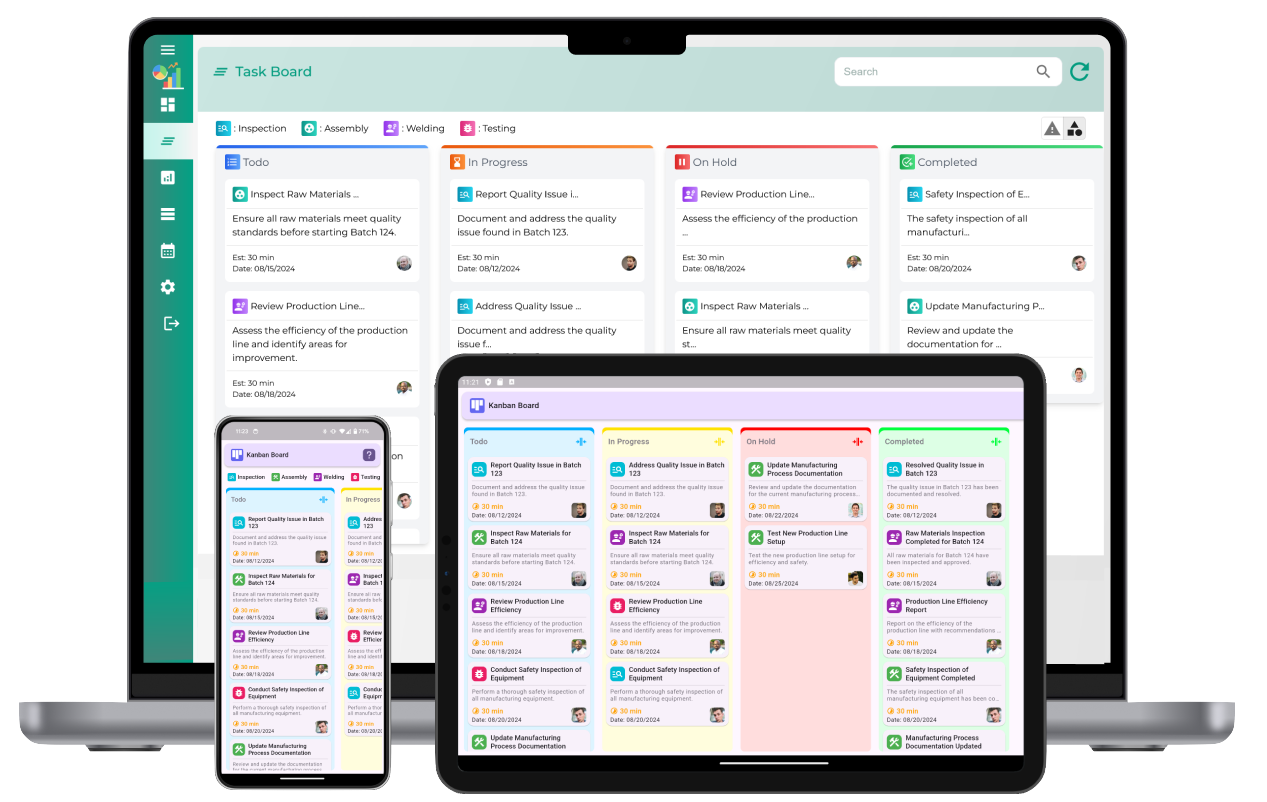
A Kanban board consists of columns representing different workflow stages, such as "To Do," "In Progress," and "Completed." Tasks are represented as cards that move through these stages as work progresses. This method provides a clear overview of task status, bottlenecks, and team workload.
2. Key Features of an Online Kanban Tool
- Customizable Boards: Create and configure boards to match specific workflows.
- Task Assignment: Assign tasks to team members with deadlines and priority levels.
- Drag-and-Drop Functionality: Move tasks effortlessly between columns.
- Real-Time Collaboration: Enable team members to update task statuses instantly.
- Automation: Set up automated workflows to enhance efficiency.
- Analytics and Reporting: Track performance metrics to optimize processes.
3. How to Set Up a Kanban Board Online
Step 1: Define Your Workflow
Start by identifying the key stages of your workflow. Common columns include "Backlog," "To Do," "In Progress," and "Done." Customize these stages based on your team’s needs.
Step 2: Create a New Kanban Board
Set up a digital board within the tool. Name the board according to the project or process it represents. Configure columns to reflect different work stages.
Step 3: Add Tasks as Kanban Cards
Create task cards that include essential details such as:
- Task description
- Assigned team member
- Due date
- Priority level
- Attachments and additional notes
Step 4: Assign Tasks and Start Tracking
Allocate tasks to team members and move cards across columns as progress is made. Utilize color coding to differentiate task types and priorities.
Step 5: Monitor and Optimize Workflow
Use built-in analytics to assess task completion rates, identify bottlenecks, and improve efficiency. Regularly review and refine workflows to enhance productivity.
4. Benefits of Using an Online Kanban Tool
- Enhanced Visibility: Gain a clear overview of task progress.
- Better Collaboration: Enable seamless communication within teams.
- Increased Efficiency: Reduce delays and optimize task flow.
- Scalability: Adaptable for teams of any size and complexity.
- Data-Driven Insights: Leverage analytics to make informed decisions.
5. The Future of Online Kanban Boards
With advancements in automation, AI-powered insights, and integration capabilities, online Kanban tools will continue to evolve. Businesses that adopt digital Kanban solutions can expect greater flexibility, improved task management, and continuous workflow optimization.
By leveraging an online Kanban board, teams can streamline operations, increase transparency, and enhance overall productivity.
Create and manage Kanban boards online with this tool
What is a Kanban board?
A Kanban board is a visual tool used for managing tasks and workflows by organizing them into different stages.
How does an online Kanban board work?
An online Kanban board allows users to create, move, and track tasks digitally across different workflow stages.
What are the key components of a Kanban board?
The main components are columns (workflow stages), task cards, labels, and WIP (Work in Progress) limits.
What are the benefits of using an online Kanban board?
Online Kanban boards provide real-time collaboration, task visibility, workflow automation, and remote access.
How do you create a Kanban board online?
To create a Kanban board, set up workflow columns, add task cards, assign team members, and define priorities.
Can you customize columns in an online Kanban board?
Yes, online Kanban boards allow users to customize columns based on their specific workflow needs.
How can teams collaborate using a Kanban board?
Teams can collaborate by assigning tasks, leaving comments, updating statuses, and sharing real-time progress.
What types of tasks can be managed on a Kanban board?
Kanban boards are used for project management, software development, inventory tracking, and task prioritization.
How do you track progress using a Kanban board?
Progress is tracked by moving task cards through different workflow stages from start to completion.
Can an online Kanban board integrate with other tools?
Yes, most online Kanban boards support integration with task management, communication, and reporting tools.
How do you limit work in progress (WIP) on a Kanban board?
WIP limits are set by restricting the number of active tasks in each column to prevent overload and improve efficiency.
Can multiple users access the same Kanban board?
Yes, online Kanban boards allow multiple users to collaborate in real-time with role-based access control.
How do you move tasks between stages on a Kanban board?
Tasks are moved by dragging and dropping cards across columns as they progress through the workflow.
What industries can benefit from using a Kanban board?
Kanban boards are widely used in IT, manufacturing, healthcare, education, and service industries.
What are the best practices for managing a Kanban board effectively?
Best practices include setting clear WIP limits, regularly updating tasks, reviewing progress, and optimizing workflows.