Kanban boards have revolutionized the way teams manage tasks, visualize workflows, and optimize productivity. A well-structured Kanban board can help a team stay organized, focused, and efficient. With the increasing number of project management tools available, it is essential to choose one that provides value while being cost-effective.
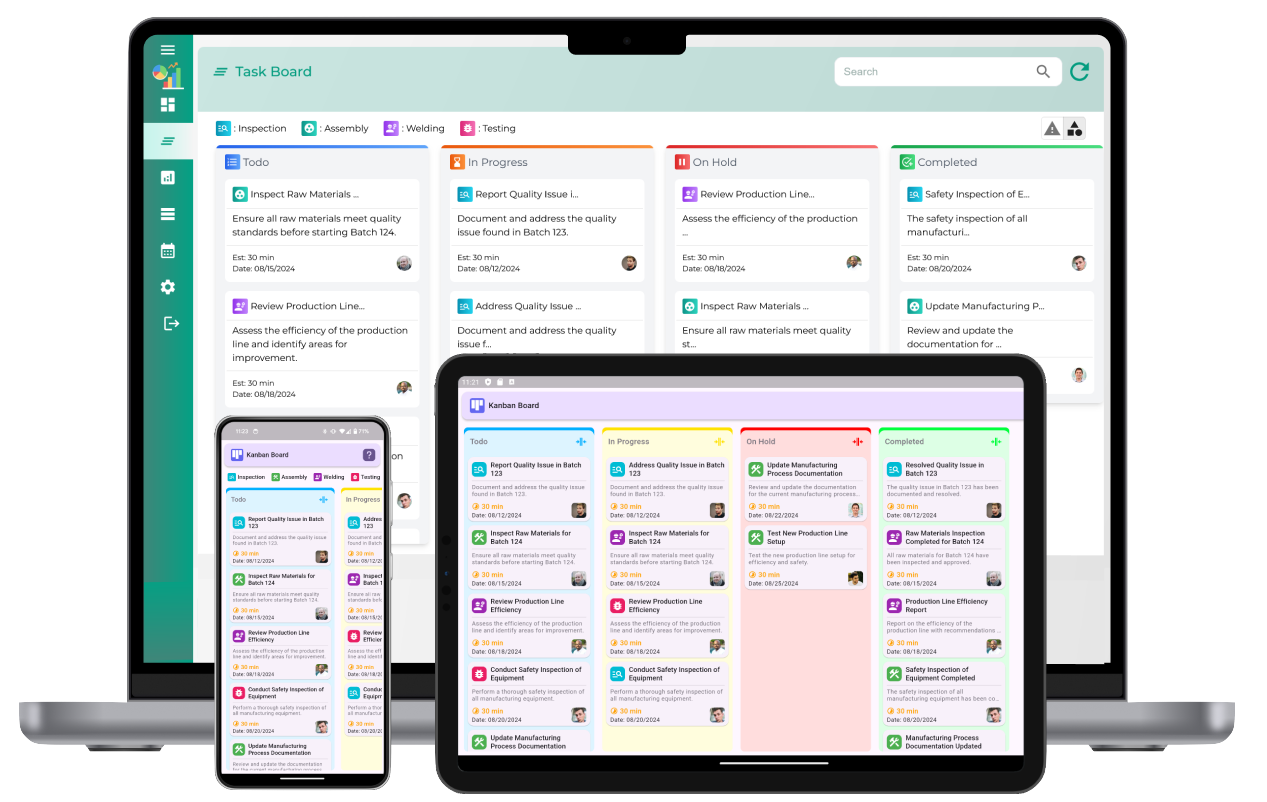
1. Understanding Kanban Boards
At its core, a Kanban board is a visual tool used to manage and optimize the flow of work. The board typically consists of columns representing different stages of work, such as "To Do," "In Progress," and "Done." Tasks or items are represented as cards that move from left to right across the board as they progress through the workflow. This allows teams to visualize progress, identify bottlenecks, and ensure smooth task transitions.
2. Why Choose Affordable Kanban Board Software?
While there are many high-end project management tools with Kanban capabilities, many of them come with hefty subscription fees or complex features that are unnecessary for smaller teams or simple workflows. For startups, small businesses, and individuals, cost-effective Kanban board software is a smart choice. Affordable solutions provide essential features without breaking the bank, making them accessible to a wide range of users.
Some key reasons to consider affordable Kanban board software include:
- Cost-effectiveness: Budget-friendly options help you maximize your return on investment without sacrificing quality.
- Ease of use: Simple and intuitive interfaces ensure that you can quickly get started with minimal learning curve.
- Customizability: Many affordable Kanban boards offer flexibility in tailoring columns, workflows, and task attributes to suit your needs.
- Collaboration: These tools often include team collaboration features such as task assignments, comments, and file attachments.
3. Essential Features of Cheap Kanban Software
When looking for affordable Kanban board software, it is essential to prioritize key features that enhance productivity and workflow management. Here are some features to look for:
- Drag-and-drop functionality: The ability to move tasks easily between columns makes it simple to track progress and update task statuses.
- Task management: Each task or card should allow for detailed descriptions, priority levels, deadlines, and file attachments.
- Collaboration tools: Look for software that enables team members to comment on tasks, assign responsibilities, and track progress collaboratively.
- Customizable workflows: The ability to create custom columns, stages, or labels ensures that the Kanban board suits your team’s unique needs.
- Notifications and alerts: Get notified when tasks are updated, deadlines approach, or team members add comments to a task.
- Reporting and analytics: Basic reporting tools, such as task completion rates or cycle time analysis, can help track team productivity and identify areas for improvement.
4. The Benefits of Using Kanban Board Software
Implementing Kanban software can significantly improve team efficiency and workflow management. Here are some key benefits:
- Visual clarity: Kanban boards make it easy to see the status of all tasks at a glance, reducing confusion and improving focus.
- Improved workflow efficiency: By visualizing workflows and limiting work in progress (WIP), teams can reduce delays and bottlenecks, making processes smoother and faster.
- Enhanced collaboration: Kanban board software fosters better communication and collaboration by allowing team members to stay on the same page with task updates and discussions.
- Better time management: With task deadlines, priorities, and alerts in place, teams can stay on track and meet goals more effectively.
- Continuous improvement: By tracking progress and monitoring bottlenecks, teams can continuously improve workflows to optimize efficiency.
5. How to Choose the Best and Cheapest Kanban Board Software
While affordability is important, the best Kanban board software must meet your team’s specific needs. Here are some factors to consider when choosing:
- Usability: The software should be easy to set up and use, without the need for complex training or a steep learning curve.
- Scalability: Choose a tool that can grow with your team. You may need additional features or integrations in the future as your projects become more complex.
- Customer support: Good customer support is crucial in case you encounter issues or need assistance with the software.
- Integrations: Ensure that the Kanban software integrates well with other tools your team uses, such as time tracking, file sharing, or communication apps.
- Free trials: Look for software that offers a free trial so you can test it out before committing to a paid plan.
6. Popular Affordable Kanban Software Options
Several Kanban board software options are available, with free or low-cost plans that provide excellent value for teams looking to improve task management. Many of these tools offer essential features without a hefty price tag, making them ideal for smaller teams or businesses with limited budgets.
Cheap and Best Kanban board software
What is Kanban board software?
Kanban board software is a digital tool that helps teams visualize, manage, and track workflows by organizing tasks into columns, typically representing different stages of work (e.g., "To Do", "In Progress", "Done").
Why should I use Kanban board software?
Kanban board software improves productivity by providing a clear visual representation of tasks, reducing confusion, and helping teams stay organized and aligned with their goals and deadlines.
What are the key features of a good Kanban board software?
Key features include customizable boards, task categorization, drag-and-drop functionality, deadline tracking, collaboration tools, notifications, and integration with other business tools for seamless workflow management.
How does Kanban board software improve task management?
By visualizing the workflow, Kanban board software enables teams to track tasks in real-time, identify bottlenecks, prioritize work, and ensure that no tasks are overlooked, resulting in more efficient task management.
Can Kanban board software help with team collaboration?
Yes, Kanban board software promotes collaboration by allowing teams to update tasks, add comments, share files, and assign responsibilities in real time, ensuring everyone is aligned and informed.
Is Kanban board software suitable for small businesses?
Kanban board software is highly suitable for small businesses as it offers an easy-to-use, cost-effective way to manage tasks, streamline workflows, and improve team communication without requiring extensive resources.
What are the benefits of using cheap Kanban board software?
Cheap Kanban board software provides essential features like task tracking and team collaboration at an affordable price, making it accessible to small businesses and startups without sacrificing efficiency.
Can I use Kanban board software for personal project management?
Yes, Kanban board software can be effectively used for personal project management, helping individuals organize tasks, track progress, and set priorities, all while maintaining a visual overview of their workload.
How do Kanban board systems help with workflow optimization?
Kanban board systems help optimize workflows by allowing teams to visualize and streamline the movement of tasks, identify bottlenecks, and implement continuous improvement practices to reduce waste and enhance productivity.
What are the limitations of cheap Kanban board software?
Cheap Kanban board software may lack advanced features like detailed reporting, integrations with other tools, or highly customizable workflows, which could limit scalability or the ability to adapt to more complex needs.
How do I choose the best Kanban board software for my team?
To choose the best Kanban board software, consider factors like the ease of use, customization options, collaboration features, integrations with your existing tools, and whether it meets the specific needs of your team.
How does Kanban board software help with tracking progress?
Kanban board software allows teams to track progress visually by moving tasks across columns based on their current stage, providing a clear picture of ongoing work and completed tasks.
Can Kanban board software integrate with other business tools?
Yes, many Kanban board software solutions can integrate with other business tools, such as CRM systems, project management software, and communication platforms, to provide a comprehensive solution for managing work and collaboration.
How does Kanban board software enhance productivity?
Kanban board software enhances productivity by providing a clear, visual structure that helps teams focus on priority tasks, reduce time spent on administrative work, and ensure that resources are allocated efficiently.
Is there a free version of Kanban board software available?
Yes, many Kanban board software options offer free versions with limited features, allowing individuals and small teams to benefit from task management capabilities without cost. However, advanced features may require a paid version.