TCard software is a powerful tool designed to streamline workflow management across various industries. This digital adaptation of the traditional TCard system enables businesses to organize tasks, track progress, and enhance team collaboration efficiently. With its simplicity and effectiveness, TCard software is becoming an essential component of modern workflow management.
What is TCard Software?
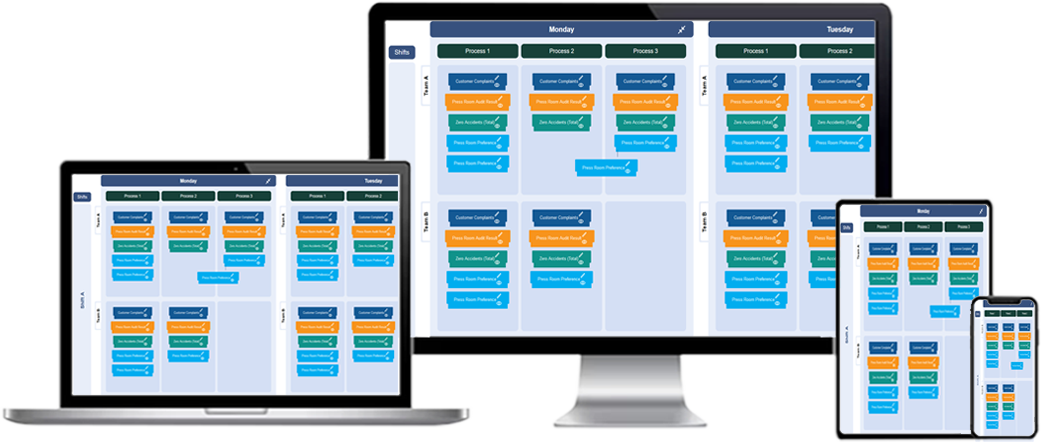
TCard software replicates the functionality of physical TCards in a digital environment. It allows organizations to categorize tasks, assign responsibilities, and visualize workflows using customizable boards and cards. These cards typically represent tasks or activities, and they can be moved between columns representing different stages of a workflow, such as "To Do," "In Progress," and "Completed."
Key Features of TCard Software
- Customizable Boards: Create tailored boards to suit specific workflows and processes.
- Task Assignment: Assign tasks to team members with clear ownership and deadlines.
- Progress Tracking: Monitor task statuses in real-time by moving cards across workflow stages.
- Collaboration Tools: Facilitate team communication with built-in notes, comments, and file-sharing features.
- Data Analytics: Gain insights into task completion rates, bottlenecks, and team performance through reporting features.
Benefits of Using TCard Software for Workflow Management
- Improved Organization: TCard software organizes tasks visually, making it easier to manage workloads.
- Enhanced Collaboration: Teams can work together seamlessly, sharing updates and feedback directly within the platform.
- Time Efficiency: Automated tracking and notifications reduce the need for manual updates.
- Flexibility: Adaptable to various industries and workflows, from manufacturing to healthcare.
- Better Decision-Making: Real-time data allows managers to make informed decisions about resource allocation and priorities.
How to Implement TCard Software in Your Organization
1. Define Your Workflow
Identify the key stages of your workflow and define the columns for your TCard board. Typical stages include "Backlog," "To Do," "In Progress," and "Completed."
2. Set Up the TCard Board
Customize the board to reflect your workflow. Add columns for each stage and create placeholder cards for tasks.
3. Add Tasks
Input tasks into the system, ensuring that each card includes essential information like task name, assigned person, priority, and deadline.
4. Assign Responsibilities
Assign tasks to team members, ensuring clarity on who is responsible for each activity.
5. Monitor Progress
Track the movement of cards across the board as tasks progress. Use analytics to identify potential bottlenecks and optimize workflow.
6. Regular Updates
Encourage the team to update the board regularly to maintain accuracy and ensure all members are informed.
Applications of TCard Software
- Manufacturing: Manage production schedules, monitor inventory, and streamline assembly line tasks.
- Healthcare: Coordinate patient care, schedule appointments, and track medical procedures.
- Project Management: Plan, execute, and monitor project tasks effectively.
- Logistics: Organize shipping schedules, track deliveries, and manage supply chains.
Challenges and Solutions
While TCard software offers many benefits, organizations may face challenges during implementation. These include resistance to change, lack of training, and inadequate customization. To address these, provide comprehensive training for team members, involve them in the customization process, and highlight the software's advantages in enhancing productivity and collaboration.
Best TCard software for workflow management
What is TCard software, and how does it support workflow management?
TCard software is a digital tool designed to manage workflows by visually organizing tasks on cards and boards. It provides a structured way to track, prioritize, and manage tasks, ensuring smooth workflow execution.
How does TCard software improve task visibility in workflow management?
TCard software improves task visibility by using digital boards and color-coded cards to display task statuses, priorities, and deadlines, making it easy to understand progress at a glance.
What are the key features of TCard software for workflow management?
Key features include task tracking, customizable boards, color-coded priority systems, deadline alerts, real-time updates, and integration with reporting tools for enhanced workflow management.
Can TCard software be customized for specific workflow requirements?
Yes, TCard software offers customization options, such as tailored board designs, task categories, and user-specific workflows, to meet unique organizational needs.
How does TCard software handle task prioritization?
Task prioritization is managed through features like color-coded cards, tags, and priority levels, allowing users to focus on high-importance tasks first.
Is TCard software suitable for teams of all sizes?
Yes, TCard software is scalable and can accommodate small teams as well as large organizations, offering tools that adapt to different team sizes and workflows.
How does TCard software ensure efficient resource allocation?
TCard software helps allocate resources by assigning tasks to team members and tracking workload, ensuring that resources are utilized efficiently and effectively.
Can TCard software integrate with other management tools?
Yes, TCard software often includes integration capabilities with tools like email, calendars, and reporting software, enhancing overall workflow efficiency.
How does TCard software handle real-time updates and notifications?
Real-time updates and notifications keep team members informed about task progress, changes, and deadlines, ensuring timely communication and action.
What visual elements does TCard software use for workflow tracking?
TCard software uses boards, columns, and cards, often enhanced with visual aids like color-coding, icons, and progress bars, to make tracking intuitive.
Can TCard software be used for remote team collaboration?
Yes, TCard software is ideal for remote teams, offering cloud-based access, shared boards, and real-time collaboration features to streamline workflow management.
What types of industries benefit most from using TCard software?
Industries like manufacturing, healthcare, construction, education, and IT benefit significantly from TCard software for managing workflows and tracking progress.
How does TCard software support continuous improvement in workflows?
By analyzing task performance, tracking bottlenecks, and providing actionable insights, TCard software enables teams to refine workflows and improve efficiency.
Is it possible to track multiple workflows simultaneously with TCard software?
Yes, TCard software supports tracking multiple workflows by offering separate boards or workspaces for different projects, ensuring efficient management.
What are the challenges of implementing TCard software for workflow management?
Challenges include the initial setup and customization effort, user training, and ensuring team adoption for effective use of the software’s features.