What Is Digital Balanced Scorecard Software and How Does It Work?
A Modern Approach to Strategic Performance Management
Digital balanced scorecard software is a tool that helps organisations manage and track their strategic goals in a structured, visual format. It replaces traditional spreadsheets and paper-based systems with a centralised, digital platform. This makes it easier to align daily activities with long-term objectives across all departments.
Understanding the Core Framework
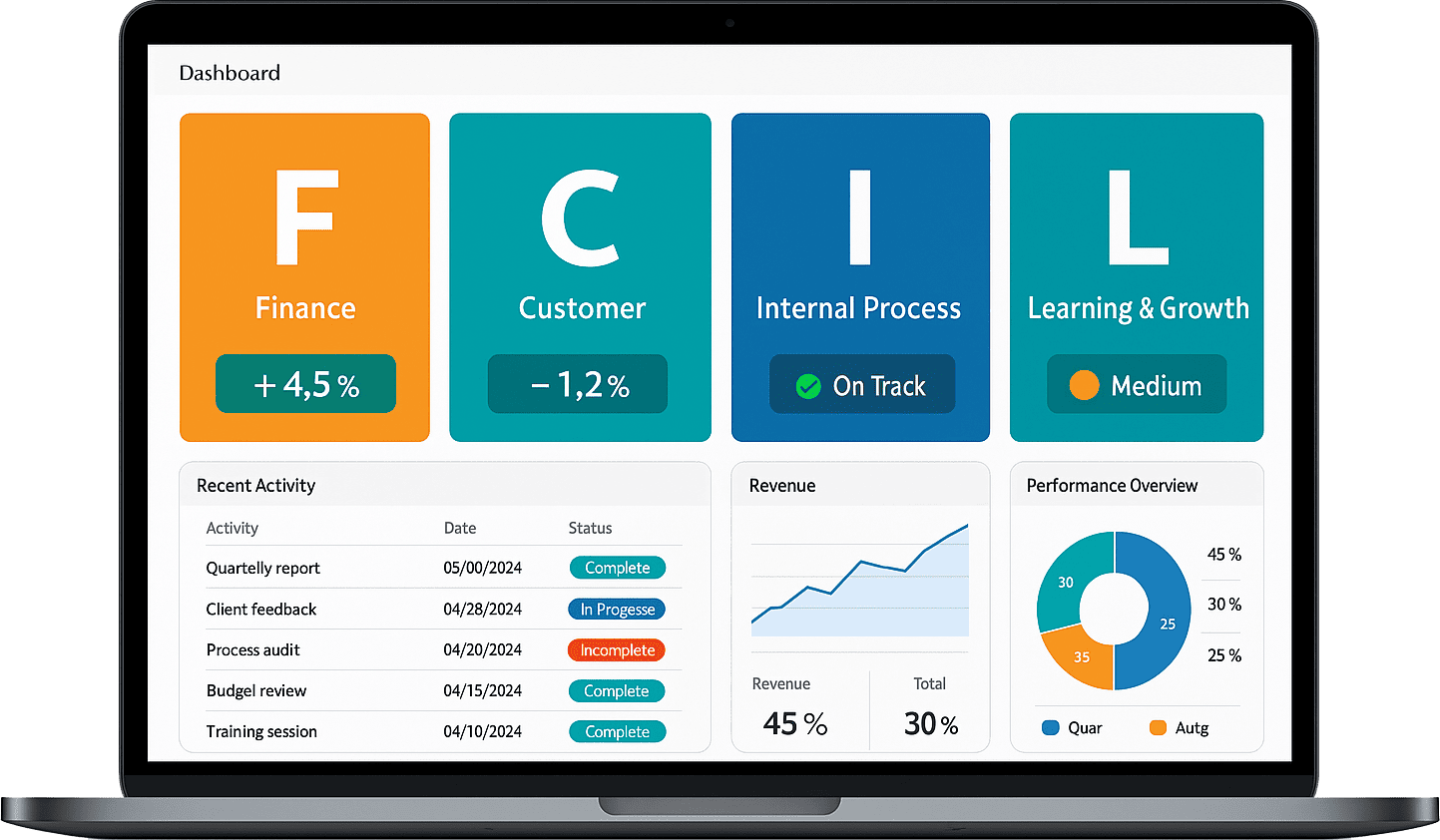
The balanced scorecard approach measures performance across four key areas: financial, customer, internal processes, and learning and growth. Digital software allows you to input goals, set targets, assign responsibilities, and track real-time progress. It ensures that every team knows how their work supports the organisation’s wider strategy.
How the Software Works
Users can create objectives and link them to specific key performance indicators (KPIs). Dashboards display updates using simple visuals such as graphs, traffic-light colours, and scorecards. This makes it easy to spot areas that are on track or need attention. Many tools also allow users to schedule reviews, set deadlines, and collaborate across teams.
Benefits of Going Digital
By using a digital platform, updates can be made instantly and accessed by all stakeholders. This improves transparency, speeds up decision-making, and helps ensure that the entire organisation is working towards the same goals. Automated reporting also saves time and reduces the risk of manual errors.
Top Features to Look for in the Best Online BSC Tools
Easy-to-Use Interface
A good online balanced scorecard (BSC) tool should have a clear and simple interface. Users at all levels should be able to navigate dashboards, update goals, and view performance with minimal training. A clean layout makes it easier to focus on strategic tasks instead of learning the system.
Customisable Strategy Maps and KPIs
Look for tools that allow you to build custom strategy maps and define your own KPIs. This flexibility ensures the software fits your organisation’s unique goals, whether you're focusing on customer satisfaction, financial performance, internal processes, or employee development.
Real-Time Dashboards and Visual Reporting
Visual dashboards give a quick overview of progress. Real-time updates using colour indicators, charts, and graphs help teams quickly identify what’s on track and what needs attention. A strong tool makes it easy to share this data in meetings or reports without extra effort.
Role-Based Access and Collaboration
The best tools support team collaboration by allowing different access levels for users. Leaders can set goals, managers can update progress, and staff can see how their work contributes to broader objectives. This shared visibility boosts accountability and alignment.
Automated Notifications and Progress Tracking
Automatic reminders and alerts help teams stay focused on targets. Whether it’s an upcoming review or a missed milestone, timely updates ensure that no task is forgotten and that action can be taken quickly when needed.
Comparing the Leading Balanced Scorecard Platforms Available Online
Understanding What Sets Each Platform Apart
Choosing the right balanced scorecard platform can make a big difference in how effectively your organisation tracks and achieves strategic goals. While most platforms support the core principles of the balanced scorecard—tracking performance across financial, customer, internal processes, and learning areas—they vary in features, ease of use, and reporting options.
User Experience and Navigation
Some platforms focus heavily on ease of use, offering clean dashboards and drag-and-drop tools for setting up goals and KPIs. Others may require more setup time but offer deeper customisation options. If your team includes users with varying technical skills, selecting a user-friendly interface is essential.
Visual Reporting and Dashboards
All strong platforms offer visual reporting, but the level of clarity and control differs. Some tools offer real-time charts, colour indicators, and automated performance summaries, while others may focus more on manual input and basic graphs. A platform that presents performance data clearly and accessibly will support better decision-making.
Flexibility and Integration
The top platforms allow organisations to customise strategy maps, add unlimited KPIs, and align departmental goals. Some also support integration with other systems like project tracking, budgeting, or HR tools, helping to connect scorecard performance with day-to-day operations.
Scalability and Collaboration
If your organisation is growing or involves multiple teams, choose a platform that allows role-based access, easy sharing, and smooth collaboration. This ensures everyone stays aligned and involved in achieving company-wide objectives.
How BSC Software Helps You Align Strategy with Measurable KPIs
Bringing Strategy into Daily Focus
Balanced Scorecard (BSC) software helps organisations turn broad strategic goals into clear, measurable key performance indicators (KPIs). It provides a structured way to connect high-level objectives with the actual work being done, making it easier for teams to stay aligned and focused on what matters most.
Setting Clear and Trackable KPIs
With BSC software, each strategic goal is linked to one or more KPIs that can be measured regularly. These KPIs act as signposts, showing whether you’re on the right path or need to take corrective action. For example, a goal to improve customer satisfaction might be linked to KPIs like response time or customer survey results.
Ensuring Everyone Is Aligned
When teams use the same platform to view objectives and progress, it creates alignment across departments. Everyone knows what the targets are, how success is measured, and where their efforts fit in. This shared understanding improves communication, accountability, and results.
Tracking Progress with Visual Dashboards
BSC software displays KPI performance through dashboards that use graphs, colour indicators, and real-time updates. These visuals make it easier to understand how each area is performing and where attention is needed. Regular tracking supports informed decision-making and ongoing improvement.
Adjusting Strategy Based on Results
As performance data builds up, organisations can compare targets with actual results. This feedback allows leaders to review the strategy, adjust goals, and reallocate resources, keeping the business agile and focused.
Benefits of Using Cloud-Based Balanced Scorecard Tools for Remote Teams
Access Anytime, Anywhere
One of the biggest advantages of cloud-based balanced scorecard tools is accessibility. Remote teams can log in from any location, using any device with an internet connection. This ensures that all team members, whether on-site or working from home, stay connected to strategic goals and performance updates in real time.
Improved Collaboration Across Locations
Cloud-based platforms allow teams to work together, even if they are spread across different regions or time zones. Team members can update KPIs, add comments, and review dashboards at any time. This shared access helps promote collaboration and keeps everyone aligned, even when face-to-face meetings aren’t possible.
Real-Time Performance Monitoring
With automatic syncing and live updates, cloud-based scorecard tools ensure that all users are working from the same data. Dashboards and reports reflect current performance, making it easier to track progress, identify problems early, and make timely decisions. This is especially valuable for leaders managing remote teams who rely on up-to-date insights.
Secure Data and Automatic Backups
These tools are designed with security in mind, offering features like user access controls, data encryption, and secure cloud storage. Regular backups reduce the risk of data loss, giving teams peace of mind while working remotely.
Scalability and Flexibility
As your team grows or changes location, cloud-based tools scale easily. There’s no need for complex installations or upgrades—everything runs online. This flexibility makes them ideal for businesses with remote or hybrid work models.
Tracking Business Performance in Real-Time with Digital Dashboards
Why Real-Time Tracking Matters
In today’s fast-moving work environment, waiting days or weeks to review performance data can delay important decisions. Digital dashboards solve this by offering real-time visibility into key business metrics. With live updates, teams can monitor progress, spot issues, and take immediate action—all from a single screen.
What Digital Dashboards Offer
Digital dashboards provide a visual summary of your business’s most important data. This can include sales figures, production stats, customer feedback, or financial performance. With graphs, charts, and colour-coded indicators, these dashboards help simplify complex information and make it easy to understand at a glance.
Staying Informed Across All Levels
Whether you're part of the leadership team or working on the shop floor, digital dashboards ensure that everyone has access to the same data. Role-based views allow different departments to focus on their own key indicators, while still staying connected to overall business goals.
Encouraging Faster and Smarter Decisions
By using live data instead of outdated reports, businesses can make more informed choices. If a problem is developing—such as rising costs or missed delivery targets—it can be spotted early and addressed before it grows. This supports quicker problem-solving and improved performance over time.
Boosting Transparency and Accountability
Real-time dashboards also improve transparency by showing how teams and individuals are performing. This visibility encourages accountability, as everyone can see how their work contributes to wider goals, helping build a more engaged and focused workforce.
How to Choose the Right BSC Software for Your Organisation’s Size and Goals
Understanding Your Organisation’s Needs
Choosing the right balanced scorecard (BSC) software starts with a clear understanding of your organisation’s size, structure, and strategic goals. A smaller team may need a simple and easy-to-use tool, while larger businesses require advanced features such as multi-user access, departmental dashboards, and detailed reporting capabilities.
Matching Features with Business Goals
Different organisations focus on different outcomes—some prioritise financial growth, while others aim for operational efficiency or customer satisfaction. Choose software that allows you to define goals and track KPIs across all four BSC areas: financial, customer, internal processes, and learning and growth. The right tool should offer flexible goal-setting, visual tracking, and role-based access to support your strategy at every level.
Considering Scalability and Growth
Think about future expansion. As your organisation grows, your software should grow with you. Look for platforms that can handle more users, added departments, and evolving goals without slowing down performance. Cloud-based tools often provide better scalability for long-term needs.
Ease of Use and Support
The software you choose should be easy for your team to use, with minimal training required. Clear dashboards, drag-and-drop features, and built-in guides improve adoption. Also, check that the provider offers support channels, tutorials, and regular updates to help your team make the most of the system.
Budget and Value
Balance cost with value by comparing available features, flexibility, and support. A slightly higher investment may be worthwhile if it improves visibility, alignment, and decision-making across your organisation.
Integrating BSC Software with ERP, CRM, and Other Business Systems
Bringing All Business Data Together
Balanced Scorecard (BSC) software becomes more powerful when connected with other business systems like ERP, CRM, and HR platforms. Integration allows teams to pull live data directly into the BSC tool, reducing manual work and ensuring that key performance indicators (KPIs) are always up to date.
Creating a Single Source of Truth
When BSC software is linked with enterprise tools, it creates one central view of performance. For example, sales data from a customer system can feed directly into customer-related KPIs, while financial figures from an ERP system update cost or revenue metrics in real time. This connected approach gives decision-makers accurate, real-time insights without needing to switch between systems.
Improving Strategic Alignment
Integrated systems help align strategic goals with daily operations. Teams no longer have to guess whether their activities are supporting business priorities. With automatic data flow, progress toward goals is visible and tracked continuously, helping departments stay focused and aligned with company objectives.
Saving Time and Reducing Errors
Manual data entry is time-consuming and can lead to mistakes. Integrating BSC software with other tools reduces the need for double handling of data, saving time and improving accuracy. This means teams can spend more time analysing and acting on results rather than just collecting numbers.
Supporting a More Agile Organisation
With systems working together, businesses can react faster to changes. Whether it's a sudden drop in customer satisfaction or a shift in cost trends, real-time updates help teams adjust strategies and take action quickly, improving responsiveness across the organisation.
Security and Data Protection in Online Balanced Scorecard Platforms
Why Data Security Matters
When using an online balanced scorecard platform, protecting sensitive business data is essential. These platforms store strategic goals, performance metrics, and staff responsibilities—all of which must be kept safe. Strong data protection helps maintain trust, meet legal requirements, and prevent unauthorised access or data loss.
Access Control and User Permissions
Most platforms offer role-based access controls, allowing administrators to decide who can view or edit specific areas. This ensures that only authorised team members can make changes or access private information. Clear permission settings reduce the risk of accidental changes or data exposure.
Data Encryption and Secure Connections
To protect data while it moves between users and servers, platforms use secure connections. This means information is encrypted, making it unreadable to anyone who tries to intercept it. Secure login processes also help keep accounts protected from unauthorised access.
Automatic Backups and Data Recovery
Reliable platforms back up data regularly. This means if something goes wrong—like a technical failure or accidental deletion—information can be restored quickly. These backups are usually stored in separate, secure locations to ensure full protection.
Monitoring and Compliance
Online balanced scorecard tools often include activity logs and monitoring tools to track how the system is used. This transparency supports both internal checks and external audits. It also helps organisations meet data protection standards and policies set by their industry or region.
Customising Your Scorecard: Financial, Customer, Internal Process & Learning Metrics
Why Customisation Matters
Every organisation has different goals, so a one-size-fits-all scorecard won’t deliver the best results. Customising your balanced scorecard ensures that the metrics reflect your specific business needs, challenges, and priorities. This makes it easier to track what truly matters and focus your team’s efforts in the right areas.
Tailoring Financial Metrics
Financial goals often include profit, revenue, cost reduction, or cash flow. Depending on your organisation’s strategy, you might also track return on investment, budget control, or income growth. By choosing the right financial metrics, you get a clear view of how well your organisation is managing its resources.
Focusing on Customer Success
Customer metrics can range from satisfaction scores and retention rates to complaint volumes and delivery performance. These indicators help you understand how well you’re meeting customer needs and where improvements are needed to enhance loyalty and trust.
Improving Internal Processes
This area covers operational performance. Metrics might include production efficiency, error rates, response time, or process lead times. These help identify waste, improve workflow, and ensure consistency across teams and departments.
Developing Learning and Growth
This section tracks how your organisation is improving its people and culture. Key indicators can include training completion rates, employee engagement, or innovation activities. Measuring these helps support a strong, adaptable workforce ready for future demands.
Why Digital BSC Tools Improve Accountability and Strategic Execution
Bringing Clarity to Strategic Goals
Digital Balanced Scorecard (BSC) tools make it easier for teams to understand what the organisation is trying to achieve. By clearly displaying goals, targets, and key performance indicators (KPIs), everyone knows what success looks like. This clarity ensures that daily work is linked to long-term strategy.
Tracking Progress in Real Time
With digital dashboards, performance data is updated regularly and shared across departments. This real-time visibility helps team members and leaders stay informed about progress. It also highlights areas that need attention, making it easier to respond quickly and keep things on track.
Assigning Ownership to Goals
Digital BSC tools allow organisations to assign responsibility for each KPI. When one person or team is clearly accountable for a result, there is greater focus and commitment. Ownership encourages regular updates, follow-through on actions, and stronger engagement with strategic aims.
Improving Team Communication
These tools also support communication by giving everyone access to the same performance information. Teams can discuss challenges, successes, and next steps based on clear data. This shared understanding builds trust and supports collaboration across departments.
Creating a Culture of Continuous Improvement
Because progress is always visible and measurable, teams are encouraged to learn from their results. Digital BSC tools support regular reviews and data-driven discussions, helping to embed accountability and continuous improvement into the company’s culture.
Pricing and Licensing Models: What to Expect from BSC Software Providers
Understanding Common Pricing Approaches
Balanced Scorecard (BSC) software providers typically offer pricing models based on subscription or one-time licensing. Subscription-based pricing is the most common and usually involves a monthly or annual fee. This often includes software updates, cloud hosting, and customer support, making it suitable for businesses that prefer predictable costs and low upfront investment.
User-Based and Feature-Based Pricing
Many providers charge based on the number of users or team members who will access the platform. Some offer tiered plans where pricing increases with additional features such as advanced reporting, integration options, or custom dashboards. This allows smaller teams to start with a basic plan and upgrade as their needs grow.
On-Premise vs Cloud Licensing
While cloud-based BSC tools are popular for their ease of use and accessibility, some providers also offer on-premise licensing. This model involves a one-time fee and may require in-house IT support for maintenance. It's often chosen by businesses with strict data control requirements or specific hosting preferences.
Trial Periods and Custom Quotes
Many providers offer free trials or demo versions, allowing businesses to explore the software before committing. Larger organisations may also receive custom pricing based on specific requirements such as the number of departments, level of support, or integrations needed. This flexible approach helps match the software to the organisation’s size and budget.
Customer Reviews and Ratings: What UK Businesses Are Saying
Positive Feedback on Simplicity and Visibility
Many UK businesses praise balanced scorecard software for making strategy easier to manage. Users often highlight how simple dashboards and clear visuals help teams understand goals and stay aligned. Several reviews mention that the visual layout makes it easy to see which areas are performing well and which need improvement.
Support for Daily and Strategic Work
Companies appreciate that the software supports both long-term strategy and day-to-day operations. Reviews often mention how the tools allow teams to link daily tasks with high-level goals. This connection gives staff a better sense of purpose and improves team focus across departments.
Ease of Setup and Use
Many UK users value how quickly the software can be set up. Business owners and managers say they don’t need much technical knowledge to start using the platform. The tools are often described as user-friendly, with helpful guides and easy navigation that suit all skill levels.
Reliable Reporting and Insight
Reviewers frequently note the quality of reports and real-time updates. Teams like that they can track progress without manually creating spreadsheets or presentations. This makes meetings more productive and decisions more data-driven. Some also mention that automated reminders keep goals on schedule.
Helpful for Team Collaboration
Across sectors, users say the platform encourages collaboration. With shared access and clear targets, departments work more closely together. Many reviews mention better communication and stronger engagement as key benefits since implementing the software.
Getting Started with Digital BSC Software – Setup Tips and Best Practices
Begin with a Clear Strategy
Before setting up your digital balanced scorecard (BSC) software, ensure your organisation’s strategic goals are well defined. Knowing your objectives helps you create the right framework for tracking performance across financial, customer, internal process, and learning areas. This foundation keeps the setup focused and effective.
Set Measurable KPIs from the Start
Each strategic goal should be linked to a specific key performance indicator (KPI). These KPIs must be measurable, realistic, and relevant to your business. Clearly defining them at the beginning allows you to track progress accurately and assess whether targets are being met.
Structure Your Scorecard by Department
Break your scorecard down into departments or teams to improve ownership and accountability. Each section should reflect the goals that matter most to that area. This makes it easier for teams to stay focused, track their own results, and contribute to overall success.
Use Dashboards to Make Insights Visible
Take advantage of the visual tools available in your BSC software. Dashboards help present live data using charts, colours, and simple layouts. This makes it easier for all team members to understand performance at a glance and take action where needed.
Train and Involve Your Team Early
Involve your team in the setup process and provide training to build confidence. When staff understand how to use the software and see how their work supports broader goals, they are more likely to stay engaged and contribute to ongoing improvement.
Everything You Need to Know Before Investing in Balanced Scorecard Software
Understand Your Organisation’s Strategic Needs
Before investing in balanced scorecard software, it’s important to be clear about your organisation’s goals. Consider what you want to measure and why. Whether you're tracking financial outcomes, customer satisfaction, internal processes, or staff development, the right software should align with your overall strategy and help turn plans into action.
Check for Customisation and Flexibility
Look for a platform that allows you to customise your scorecard layout, define your own key performance indicators (KPIs), and create strategy maps. Every organisation is different, so flexibility is essential. Make sure the software can grow with your needs and support both current and future goals.
Ease of Use for All Team Members
The software should be easy to navigate for everyone—from senior leaders to front-line staff. A clean interface, simple dashboards, and helpful guides will encourage adoption across the organisation. Tools that are too complex may cause frustration and reduce overall effectiveness.
Real-Time Data and Visual Reporting
Live dashboards, graphs, and colour indicators help teams stay updated on progress. Real-time visibility allows for quicker decisions and helps everyone focus on the most urgent or underperforming areas. The ability to filter, export, and share reports is another useful feature to consider.
Support, Integration, and Security
Choose a platform that offers dependable customer support, regular updates, and data protection features. It should also integrate smoothly with other systems you already use, such as finance or HR platforms, to reduce duplicate effort and keep everything connected.
How Do I Create a Balanced Scorecard Online?
Start with Your Strategic Objectives
Creating a balanced scorecard online begins by clearly outlining your strategic goals. These should be grouped into four main areas: financial, customer, internal processes, and learning and growth. Each objective should reflect what your organisation aims to achieve in each category over a set time period.
Define Relevant KPIs for Each Goal
Once your objectives are clear, the next step is to define key performance indicators (KPIs) to measure progress. These KPIs should be specific, measurable, and aligned with the goals they support. For example, a customer satisfaction objective might include metrics like response time or feedback scores.
Select an Online Platform to Build Your Scorecard
Choose an online tool or software platform that allows you to input your goals, KPIs, and targets. Look for features like drag-and-drop layout, visual dashboards, and the ability to assign ownership to different team members. Many platforms also support progress tracking and automatic updates.
Input Your Data and Create Visual Dashboards
After setting up your scorecard, enter baseline figures and targets for each KPI. Use visual elements like graphs, colour-coded indicators, and charts to make your dashboard easy to read. This allows teams to quickly see which areas are on track and where action is needed.
Review and Update Regularly
Your online balanced scorecard should be reviewed often to ensure it stays relevant. Regular updates help teams stay aligned and responsive to changes in performance or business direction.
How to Create a KPI Scorecard
Begin by Identifying Your Key Business Goals
To create a KPI scorecard, start by listing your most important business objectives. These could relate to financial performance, customer service, operational efficiency, or team development. Each goal should be specific and clearly defined so you can measure progress accurately.
Select the Right KPIs for Each Goal
Once your goals are clear, choose key performance indicators (KPIs) that reflect how you will track success. A good KPI should be measurable, relevant, and easy to understand. For example, a delivery team might track on-time shipments, while a sales team could measure monthly revenue.
Choose a Simple Scorecard Format
Use a digital tool or spreadsheet to lay out your scorecard. Include sections for each KPI, with space to record targets, current results, and status. Add colour indicators like red, amber, and green to help you quickly see which areas need attention. Keep the layout clean and easy to follow.
Assign Ownership and Set Update Schedules
Each KPI should have a named owner responsible for tracking and reporting results. Agree on how often the scorecard will be updated—weekly, monthly, or quarterly—depending on the type of KPI. This ensures the data stays fresh and useful.
Use the Scorecard to Drive Action
A well-built KPI scorecard is more than just a report. Use it in team meetings to discuss progress, identify challenges, and plan improvements. Over time, it will help guide your decisions and support continuous growth.
How to Create a Scorecard in Excel
Start with Clear Objectives
Before building your scorecard in Excel, identify your main business goals. These should cover key areas such as financial targets, customer satisfaction, internal processes, or team development. Having clear goals helps ensure your scorecard stays focused and useful.
List Your KPIs and Set Targets
In an Excel sheet, create columns for each of the following: Objective, KPI (Key Performance Indicator), Target, Actual Result, and Status. Add rows for each performance area you want to track. For example, under “KPI” you might list customer response time or monthly revenue.
Use Conditional Formatting for Colour Indicators
To quickly highlight performance levels, apply conditional formatting. For example, you can set up traffic light colours: green if the result meets or exceeds the target, amber for slight underperformance, and red for serious shortfalls. This makes your scorecard easier to scan and understand.
Include Simple Charts or Graphs
Excel lets you insert basic charts to visualise your KPIs over time. Use bar or line graphs to show trends, helping you and your team see how performance is changing. Position these visuals beside your data table for quick reference.
Update Regularly and Save Versions
Maintain your Excel scorecard by updating it on a regular basis—weekly or monthly, depending on your needs. Save different versions to track changes and compare progress over time. This helps you stay on top of performance and make informed decisions.